

 Gemini
WebMCP lets a website register tools that AI agents in the browser can call, instead of making them work through the page’s interface. It is still an experiment: Chrome’s origin trial now runs through Chrome 162, no ship date is set, and Apple’s WebKit team opposes it. Test it on one or two useful actions, and don’t rebuild your site around it.
Contents
- What WebMCP Actually Does
- How This Differs From Crawling
- How the Chrome Origin Trial Works
- What Happens If You Don’t Implement It
- How WebMCP Relates to ACP and UCP
- Which Actions Make Good Tools
- What to Try Now
- FAQ
What WebMCP Actually Does
The WebMCP specification is a Draft Community Group Report from the W3C’s Web Machine Learning Community Group, with editors from Microsoft and Google. The document says plainly that it is not a W3C Standard and isn’t on the Standards Track.
Chrome’s documentation describes two ways for a page to declare tools:
- Imperative: JavaScript calls
document.modelContext.registerTool()with a name, description, input schema and function. Early examples usednavigator.modelContext, since removed in favor ofdocument.modelContext, so check the date on any tutorial. - Declarative: You add attributes such as
toolnameandtooldescriptionto an existing HTML form. By default the user still has to click Submit, unless you addtoolautosubmit.
A travel site could offer a tool to search availability by destination and date. A store could offer one to look up a product by SKU. The agent gets a defined input and a defined result, without having to work out the interface.
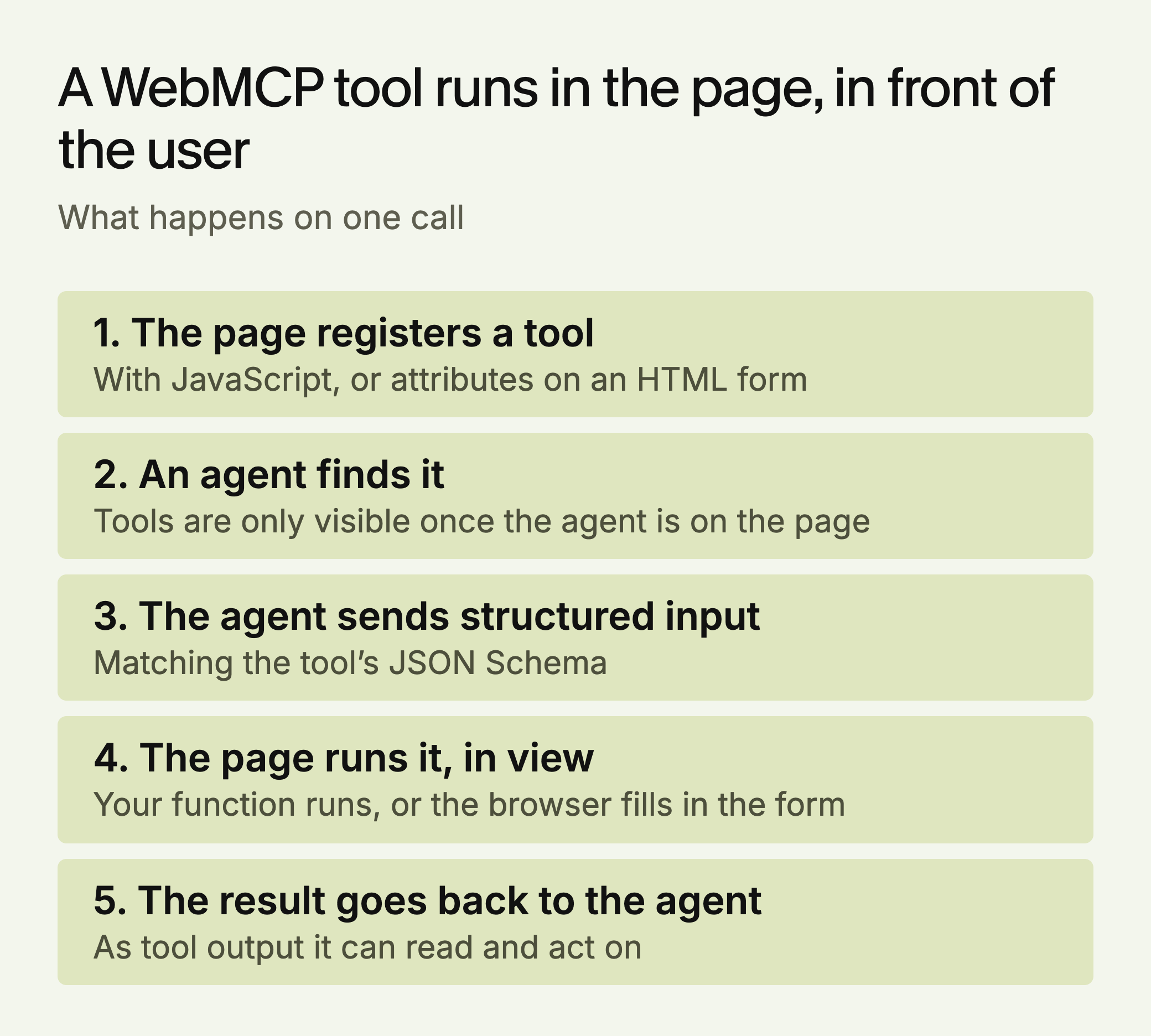
Two parts of that flow are easy to miss. Tools run on the visible page, so the user can watch the task happen. And the API is designed mainly for local browser work with a person involved. Chrome’s documentation also notes that a client has to visit a site to learn whether it has tools, so there’s no directory an agent can consult first.
How This Differs From Crawling
WebMCP doesn’t replace content work, because it serves a different moment. Tools are registered by a live page, so they matter when an agent is already on your site trying to do something. Nothing we found suggests they help an engine deciding which pages to cite.
Google’s John Mueller discussed both in a Reddit discussion reported on June 2, 2026. He called llms.txt “purely speculative for now.” He said he likes “the WebMCP approach, as well as the commerce integrations,” which “have clear goals & processes.” Separately, he speculated that “if an agent is already on your site and tasked to do something,” it “will be happy to just click around and try to complete the task with the UI too,” and that not being blocked is the biggest hurdle for most sites.
That last point matters. Agents can already use a site without WebMCP, so a clean, accessible interface is still the first job. On llms.txt, SE Ranking’s study of about 300,000 domains (vendor data) found no measurable link to citations. Don’t expect citations from it, though it may give agents a useful map.
How the Chrome Origin Trial Works
An origin trial lets a site enable an experimental feature for real visitors. Per the Intent to Experiment, WebMCP’s trial was approved for Chrome 149 through 156. Chrome Platform Status now shows it extended through Chrome 162, because trial feedback led to API changes the team wants to test. The same page lists the feature as Proposed. The original intent named Chrome 157 for shipping, but Chrome 157 has reached stable and the feature remains in trial.
You supply the token with a meta tag or an Origin-Trial HTTP header. Tokens expire, so renew them. To try it on your own machine without a token, turn on chrome://flags/#enable-webmcp-testing and relaunch. Here is a minimal tool, based on Chrome’s imperative API documentation:
await document.modelContext.registerTool({
  name: "search_products",
  description: "Search the product catalog by keyword and return matching items.",
  inputSchema: {
    type: "object",
    properties: {
      query: { type: "string", description: "Search keyword" }
    },
    required: ["query"]
  },
  annotations: { readOnlyHint: true },
  execute: async ({ query }) => {
    const res = await fetch(`/api/products/search?q=${encodeURIComponent(query)}`);
    return JSON.stringify(await res.json());
  }
});
Code in the page, or an agent in a browser extension, can list the tools with getTools() and run one with executeTool(). Chrome’s documentation warns that the API is “under active discussion and subject to change.”
The declarative version is smaller, and this example follows Chrome’s declarative API page:
<form toolname="check_availability"
      tooldescription="Check whether a product is in stock by SKU."
      action="/availability">
  <label for="sku">SKU</label>
  <input id="sku" name="sku"
         toolparamdescription="The product SKU, such as LK-156-16.">
  <button>Check</button>
</form>
When an agent calls this tool, the browser focuses the form and fills it in, and the form stays visible. Without toolautosubmit, the person presses the button. Your handler can read SubmitEvent.agentInvoked to see that an agent started it, and call preventDefault() and then respondWith() to return a result to the model. If you leave out toolparamdescription, the browser falls back to the field’s label, which is one more reason to label forms properly.
What Happens If You Don’t Implement It
Very little, for now. Nothing we found suggests that skipping WebMCP affects rankings or citations. Real agent use is also early: when the trial was announced, PPC Land reported that Gemini in Chrome support was “coming soon” without a date. Before you invest, check which agents your customers actually use.
Browser support is a real question as well. WebKit’s published position is oppose. Its argument is that an agent acting for a user is effectively assistive technology, and that fixes belong in shared semantics like HTML and ARIA.
One useful check is free. Lighthouse’s Agentic Browsing category audits WebMCP tool registration, agent-focused accessibility, layout stability and whether an llms.txt file exists. It is experimental, requires Chrome 150 or later, and its WebMCP audits need trial registration. Passing it doesn’t show that any agent will use your site.
How WebMCP Relates to ACP and UCP
These are separate efforts that solve different problems. WebMCP works inside a page in the browser. The Agentic Commerce Protocol and Universal Commerce Protocol define how agents and businesses exchange catalog, cart, checkout and order information, typically over server APIs, and UCP also builds in MCP.
| WebMCP | ACP and UCP | Content work | |
|---|---|---|---|
| When it matters | An agent is on your page | An agent is buying | An engine is choosing sources |
| Where it runs | In the browser tab | Between servers | On pages engines retrieve |
| Best fit | Any site with tasks, B2B included | Stores that qualify | Nearly every site |
A retailer doesn’t need WebMCP to take part in either one, and WebMCP doesn’t enroll you in them. If you run a store, the commerce protocols and clean product data probably deserve your attention first. WebMCP may suit a B2B site better, for tasks such as checking whether a plan includes a feature or booking a demo slot, because those tasks fall outside what the commerce protocols cover.
Which Actions Make Good Tools
The annotations in Chrome’s API help you sort your actions, and the mapping below is our reading of them. All of them default to false, so set them on purpose.
| Action | Start here? | Annotation |
|---|---|---|
| Search a catalog, check stock, get a final price | Yes | readOnlyHint |
| Return user reviews or forum posts | Yes, with care | untrustedContentHint |
| Add to cart, save a filter | After read-only tools work | None needed, if easily undone |
| Book, pay, cancel, delete | Last, if at all | consequentialHint |
Chrome’s best-practices guide adds rules that are easy to overlook:
- Name what really happens.
create-eventshould create one. If it only opens a form, call itstart-event-creation-process. - Take raw input. Accept “11:00 to 15:00” as a string, and don’t ask the model to convert it to minutes.
- Validate in code. Schema constraints aren’t guaranteed.
- Return errors the model can act on, and report success only when the page really is in that state.
- Keep the list short. Each tool uses context window space and adds to completion time, so avoid overlapping tools.
What to Try Now
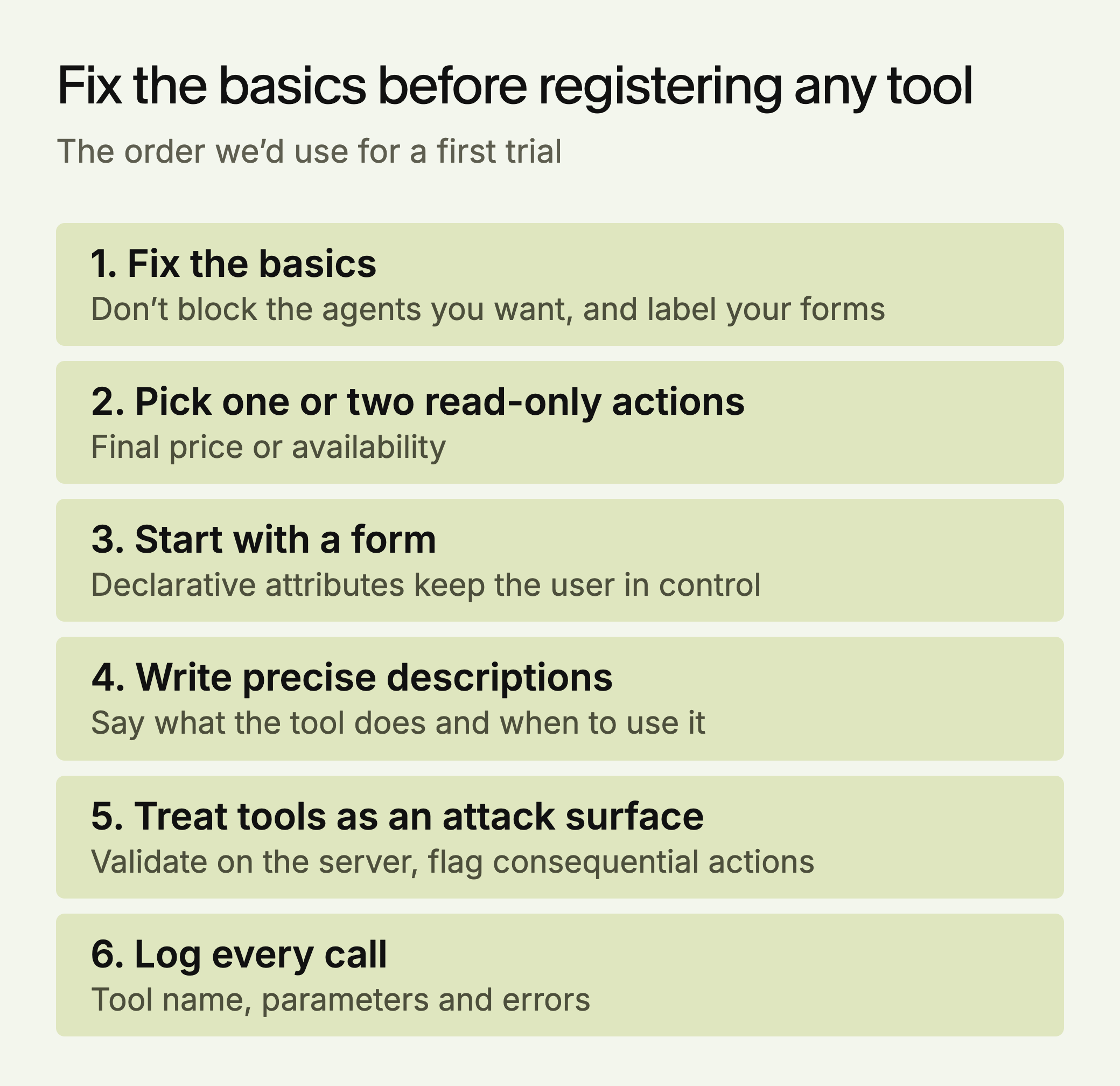
1. Fix the basics. Check that robots rules and bot protection aren’t blocking the agents you want, and that your forms have proper labels. This helps every agent and every user, whatever happens to WebMCP.
2. Pick one or two read-only actions. Good candidates are “get final price” or “check availability.” Mueller’s own example was determining the final price of a product, including fees and discounts.
3. Start with a form if you have one. The declarative attributes are the smallest possible test, and the user stays in control of the submit step.
4. Write precise descriptions. The tool’s description tells an agent what it does and when to use it. “Search the product catalog by keyword” is useful. “Get stuff” isn’t.
5. Treat tools as an attack surface. The specification covers prompt injection, tool poisoning and misrepresented intent. Set consequentialHint on anything significant or irreversible, such as a booking or payment. Validate input on the server, and limit what third-party scripts can reach. By default, cross-origin iframes can’t use the API unless you add allow="tools", so keep it that way unless you need it.
6. Log it. Record tool calls, parameters and errors from your own handler. That gives you a usage baseline that standard analytics won’t.
To tell whether a tool works, use Chrome DevTools to see how your JSON Schema is parsed, and Chrome’s Model Context Tool Inspector extension to check that an agent picks your tool for the task you meant. It needs a Gemini API key. A tool is ready when a plain-language request reaches it with correct arguments several times in a row, and when a bad input returns an error the agent can fix.
LLMagnet measures AI visibility across seven engines and has an agent that prepares fixes for you to approve. Its free audit covers the citation side, which is where we think most sites have more to gain today.





 Ask Claude



 30-day free trial · no credit card