

Advertise
It proposes. You approve.
Then it checks.
The optimization agent reads your ChatGPT Ads account, finds what’s underspending, overspending or silently not serving, and prepares one change with its evidence. It can do four things, inside two budget limits, and never on its own.
Book a demoSee what it can and can’t do
30-day free trial · no credit card
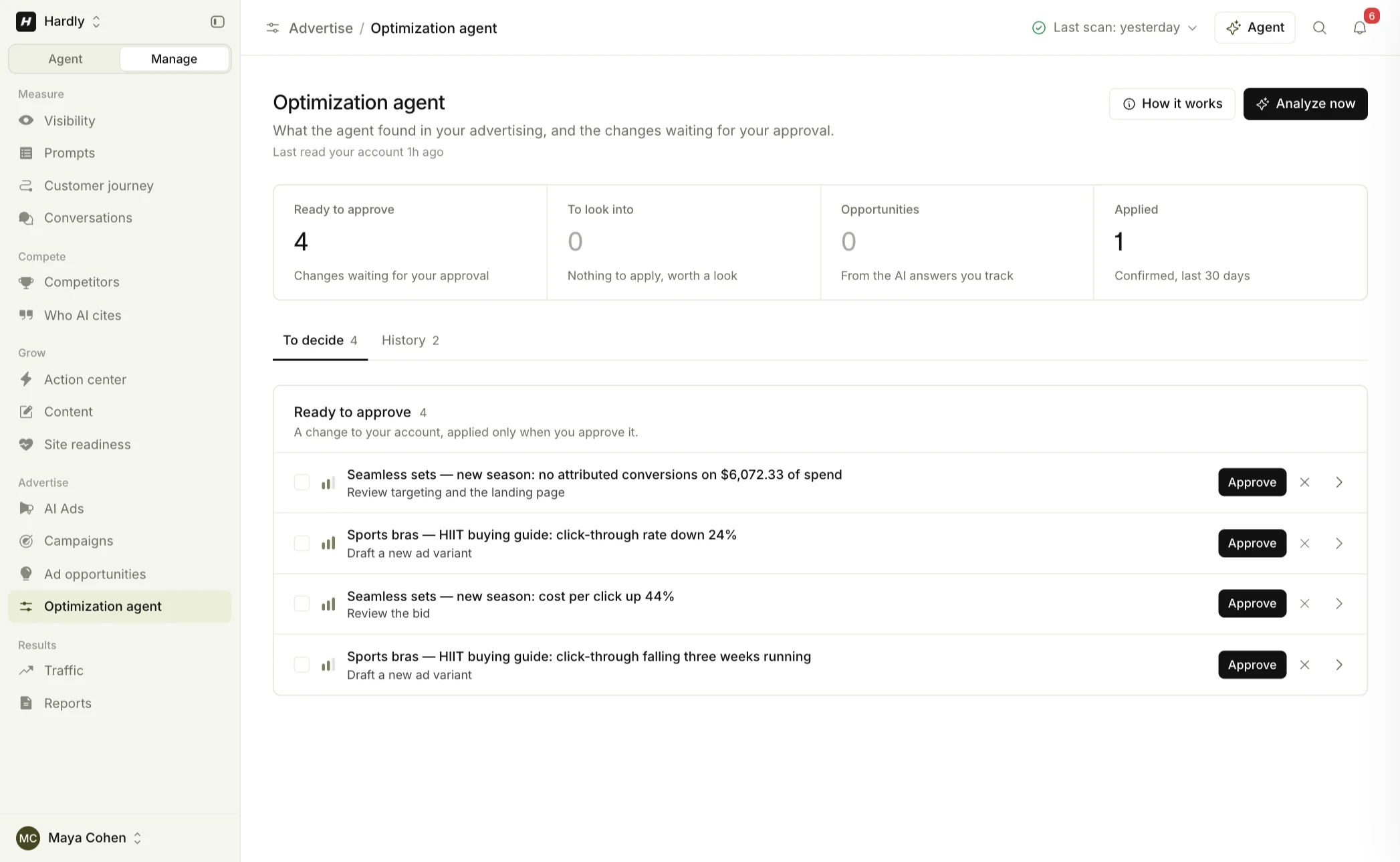
“The agent observes and proposes. It never changes your account on its own: an approval re-reads the campaign, checks it hasn’t moved since the proposal, applies the budget guardrails, sends one change, and reads it back before anything is reported as applied.”On the screen, in the product
The problem
An ad account is the worst place to find out a tool was confident
Campaign automation fails quietly and expensively. None of these announce themselves. They show up as a number at the end of the month.
- A budget multiplied by a mis-typed field
One extra zero on a daily budget, and the first anyone hears of it is the invoice.
- A change on a campaign someone else paused
Two people in one account isn’t an edge case. It’s a Tuesday.
- An action accepted and never performed
The request went through. The campaign didn’t change. The tool said done.
The shift
“Human in the loop” stopped meaning anything
Nearly every tool in this category now claims an approval step. Very few can tell you what happens in the seconds after you press the button.
The usual approval step
- Proposal
- Approve
- “Applied”
What happens here
- Proposal
- Approve
- Re-read
- Match check
- Guardrails
- One write
- Read back
- Recorded
Active, budgeted, and serving nothing
The most expensive failure in paid media is a campaign that looks fine. This is the agent finding one, and being straight that it has no fix to offer. Hover the numbers.
Rep Seamless · LeggingsActive1Active and serving are two different facts, and only one of them is in the status column.
Active but not serving
No impressions in the last 30 days while the campaign is active, with a £30.00 daily budget.
Nothing to apply · something to look into5There’s no change to approve. None of its four actions would fix this, so it says so rather than inventing a lever.
| Metric | Baseline | Current | Period | 2Every row names its source: the metric, the baseline, the current value, the period, and where it came from.Source |
|---|---|---|---|---|
| Impressions | 6,240 | 0 | 30 days | ChatGPT Ads |
| Status | Active | Active | Now | ChatGPT Ads |
| Daily budget | £30.00 | £30.00 | Now | ChatGPT Ads |
| Ads in the campaign | 2 | 2 | Now | ChatGPT Ads |
High confidence3Confidence is on the proposal, not implied by its existence.Found Nov 2, 09:12Expires Nov 94Found at a time, gone on a date. A stale proposal doesn’t sit there looking current.
DismissAcknowledge
Why it has no button
An agent that only shows you what it can act on is optimizing for its own usefulness.
- StatusActive
- Daily budget£30.00
- Ads2
- Impressions, 30 days0
Pausing it wouldn’t explain it, and a bigger budget wouldn’t serve it. None of the four actions fixes this, so it hands you the finding and steps back.
Four actions.
That’s the whole list.
Not a selection of highlights. These four are everything the agent can do inside your advertiser account.
- 01Pause a campaign
Stops a campaign that’s running.
- 02Activate a campaign
Starts a campaign that exists and has an ad.
- 03Update a campaign budget
Moves a daily budget, inside the two limits below.
- 04Create a campaign
Creates one paused, like every campaign made in LLMagnet.
And the list it can’t touch. Not guarded actions with extra steps; actions it doesn’t have.
- Creative
- Bids
- Context hints
- Objective
- Targeting
What happens in the second after you approve
One place in the application changes anything inside an advertiser’s account, and it does the same six things every time. Pick what happens in between.
Approve changeSpring training · Brand · daily budget £60.00 → £75.00
- 01Re-read the campaignLive: Paused · £60.00 · daily
- 02Check it still matchesShown Active, live Paused
- 03Apply the guardrailsNot run
- 04Send exactly one writeNot run
- 05Read it backNot run
- 06Record before and afterNot run
What you were shownActive · £60.00 · daily
Live when you approvedPaused · £60.00 · daily
PENDINGApproved, not yet completed.
Nothing is reported as applied on the strength of an accepted request: a write we could not read back is UNVERIFIED, never SUCCEEDED.
When you approve, the page sends the state it was showing you: status, budget and budget type. The server compares that with the live campaign before sending anything, so a change can never land on a campaign someone else moved in the meantime.
How we measure- PENDING
Approved, not yet completed.
- SUCCEEDED
Written and read back.
- UNVERIFIED
Sent, and we couldn’t confirm the result. Not reported as applied.
- FAILED
The write didn’t go through.
- REJECTED
The approval no longer matched the live campaign, so nothing was sent.
Found it. Now fix it.
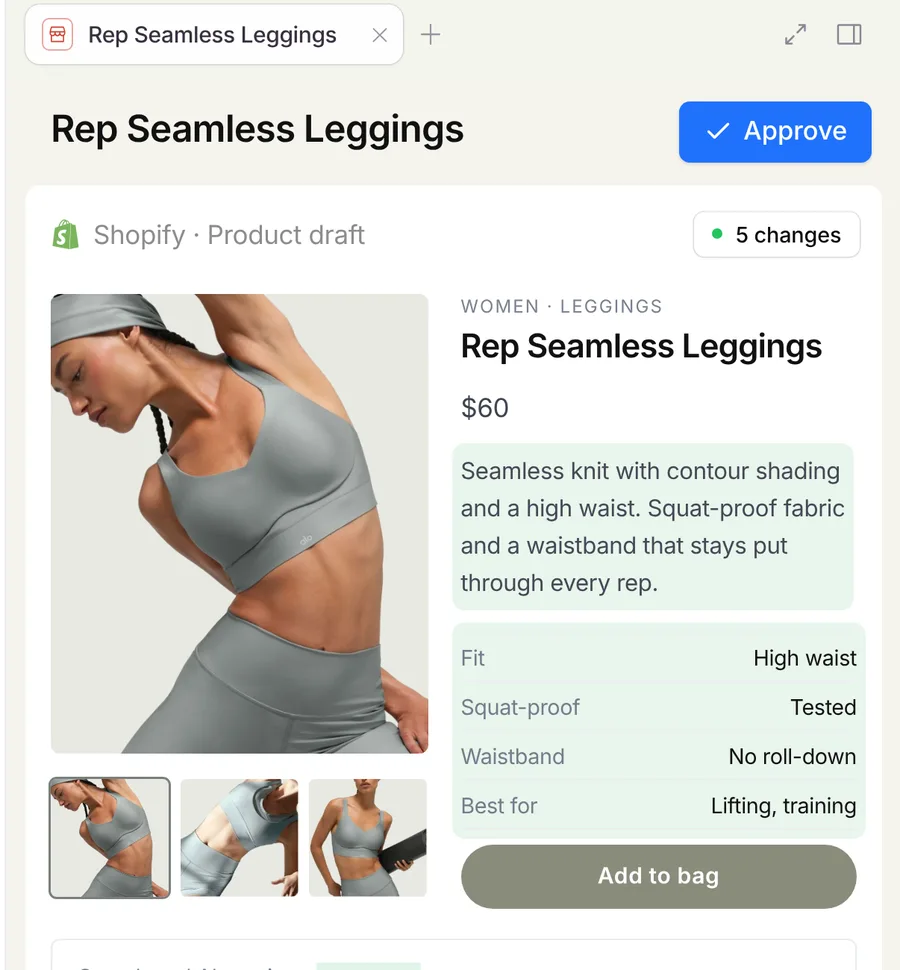
The same approval posture runs across the product. The LLMagnet agent prepares changes in your store or CMS and tells you on the card what approval will do. One agent, one habit, every surface.
Re-read, limited, read back
 Raise a daily budgetChatGPT Ads · Spring training
DismissApprove
Goes live on approval
 Rewrite product descriptionShopify · Rep Seamless Leggings
DismissApprove
Staged, not public
 Update the comparison pageWebflow · /compare
DismissApprove
Two limits,
and we’ll print them
They’re the same on the form and on the server, so a change that passes the interface still has to pass the guardrail.
- Most one approval may raise a daily budget
- ×1.25
- Daily-budget ceiling, in your account’s currency
- 1,000
- Minimum daily budget
- 1
- In practice: a £100-a-day budget can go to £125 with one approval, not to £400. To go further you approve again, and look at the account in between.
- Above the ceiling, you set it in ChatGPT Ads Manager yourself. We don’t raise it for you, and there’s no plan on which it’s higher.
- The intent, in the code’s own words: “so neither the agent nor a mis-typed form can multiply a budget.”
At most ×1.25 per approved change · ceiling £1,000.00 · minimum £1.00
Current daily budget£60.00
Proposed daily budget£75.00
Within the limits. One approval, one write, read back.
DismissApprove change
Drag the proposed budget.
What it will never do
A capability list tells you what a product wants to do. This is the other list.
It never changes your account on its own.Every change starts as a proposal, and only your approval executes one.
It never touches creative, bids, context hints, objectives or targeting.Not guarded. Simply not among its four actions.
It never multiplies a budget.At most ×1.25 per approved change, never above 1,000 in your account’s currency, never below 1, on the form and on the server.
It never applies a change to a campaign that moved since you looked.The approval carries the state you were shown. A mismatch is rejected, not reconciled.
It never calls a change applied because a request was accepted.A write it can’t read back is unverified.
It never gets write access over MCP.Claude or ChatGPT can read your campaigns, performance and recommendations through LLMagnet’s MCP tools. None of the four actions is there; approvals happen in the app. About MCP
It never activates a campaign that has no ad.The platform won’t allow it, and neither will we.
It never invents a lever.When there’s nothing to apply, the proposal says so: nothing to apply, something to look into.
Why not let it just run? I have other things to do.
Because the first wrong change would cost more than the week of approvals saved, and because we can’t put a number on how often it would be right. What we can do is make an approval cheap: the proposal arrives with its evidence, its confidence, when it was found and when it expires, and approving it takes one press. The agent does the reading. You keep the decision.
The same agent, on every surface
The same approval, in your store and CMSThe LLMagnet agent
Rewrite product descriptionShopify · goes live on approval
DismissApprove
Where proposals come from before there’s spendAd opportunities
“best squat proof leggings”Visibility gap · 80 · inferred
You appear in 0 of 7 answers
ChatGPT Ads · the account view, and how the connection worksIntegrations · it can only act where you’ve connected itAI Visibility · the organic half the opportunities are read from
Frequently asked questions
Want to see the product before you start? Take the product tour, or start a 30-day free trial.
No. Every change starts as a proposal, and only your approval executes one. The approval then re-reads the campaign, applies the budget limits, sends one write and reads the result back.

Let it read the account.
Keep the decisions.
Connect with your Advertiser API key and see what it proposes. Approve nothing until you’re ready.
Book a demo
 30-day free trial · no credit card