

The agentPro and above
It does the work.
You decide what ships.
The agent reads the answers, finds why competitors win, and prepares the change inside your store or CMS. Every change arrives as a card you approve or dismiss.
Book a demoSee what it can and can’t do
30-day free trial · no credit card
Why it matters
Knowing what’s broken was
never the hard part.
Every tool in this category can produce a list. What’s missing is the forty minutes it takes to open the CMS, work out what the winning page says, rewrite yours, and not break anything.
From an answer you lost
to a change you approved
01
It reads
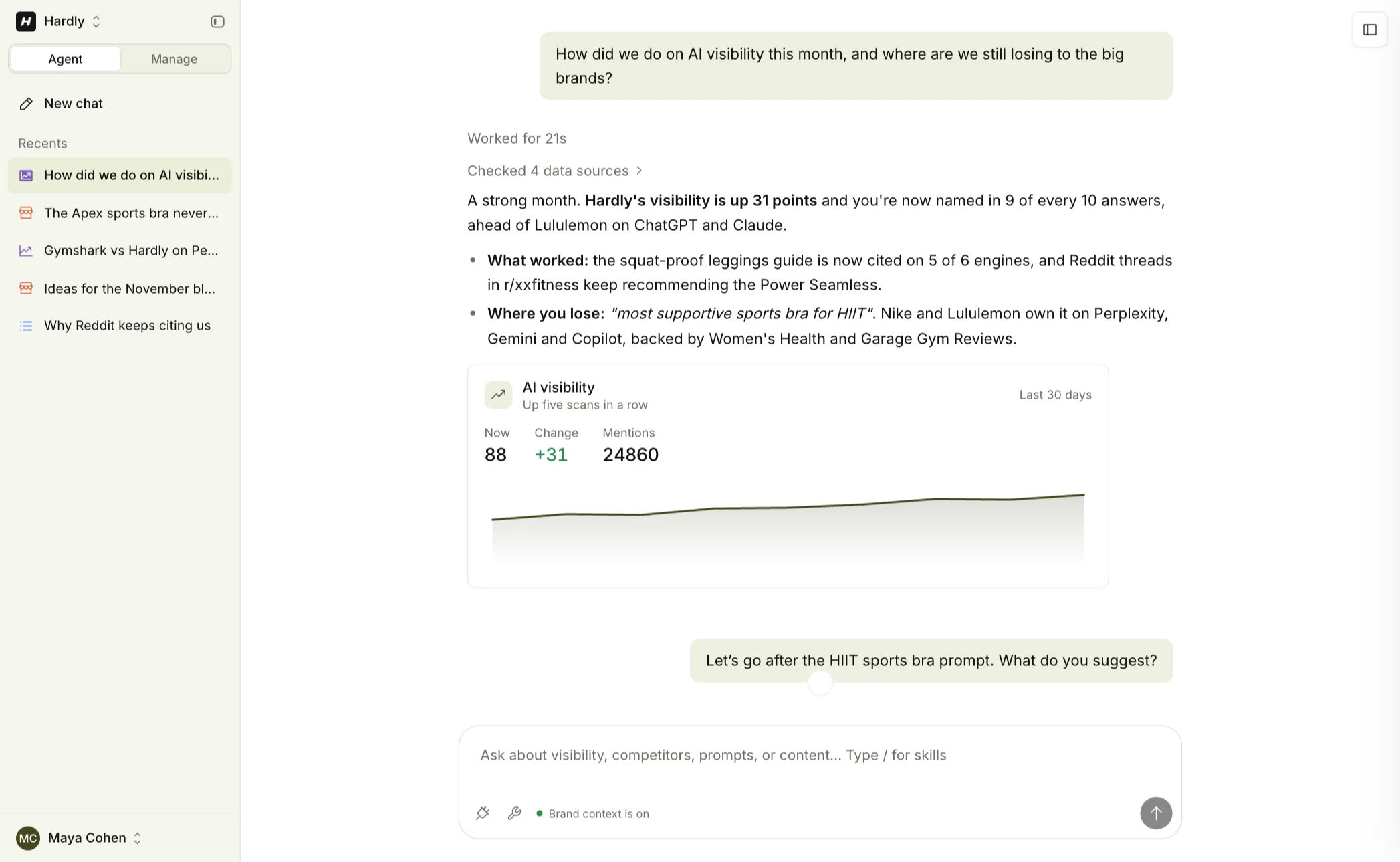
Every answer from your last scan: who was named, in what order, citing what.
AnswersPositionsCitations
02
It diagnoses
Opens the pages that won and compares them to yours, then reports what they say that you don’t.
Winning pagesYour pageThe gap
03
It prepares
Writes the change where it lives: a Shopify description, a Webflow CMS item, a WordPress post, grounded in your brand book.
ShopifyWebflowWordPress
04
You decide
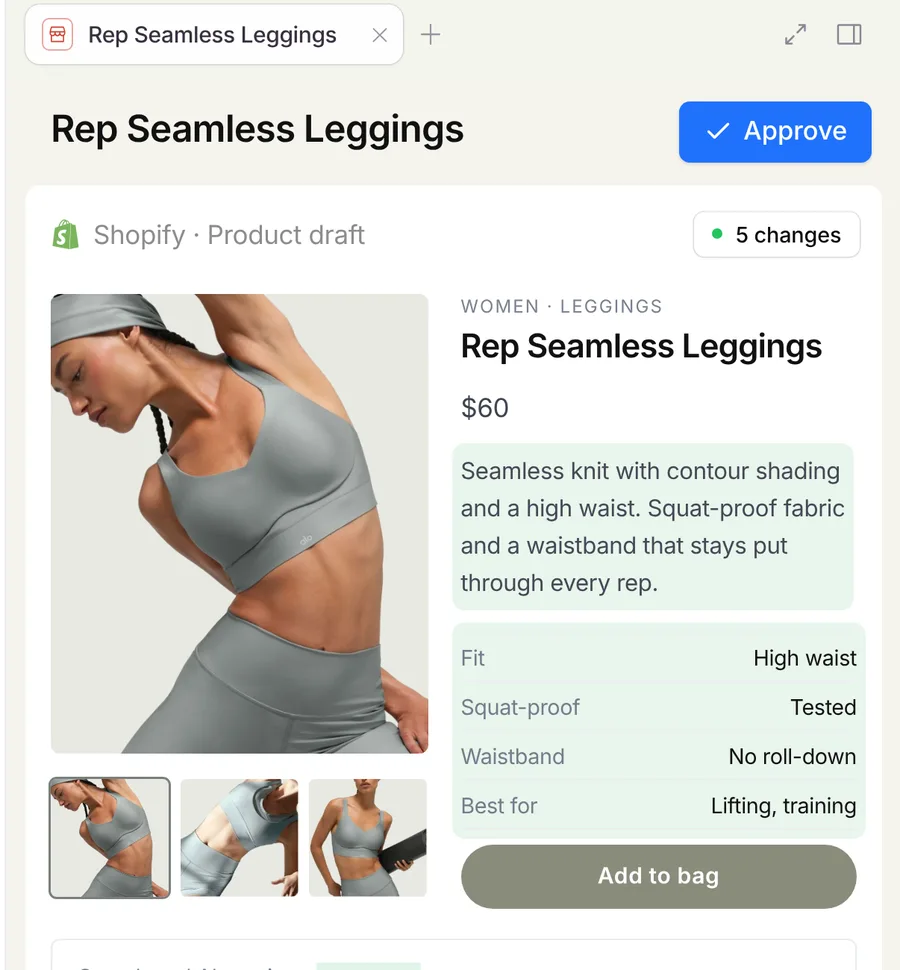
It arrives as a card: the diff, the reasoning, and what will happen if you approve.
DismissEditApprove
What happens
when you press Approve
It depends on where the change is going, and the card tells you before you press, every time.
Goes live on approval
 Rewrite product descriptionRep Seamless Leggings
DismissApprove
Staged, not public
 Update the comparison page/compare · CMS item
DismissApprove
Saved as a draft
 New answer page/blog/squat-proof-leggings
DismissApprove
| Where | What the agent prepares | What approval does |
|---|---|---|
| Shopify · products, collections | Descriptions and SEO fields | Goes live on your store. No draft stage, and the card says so plainly. |
| Shopify · articles | Blog articles | Created hidden. You publish them yourself. |
| Webflow · pages, CMS items | Content and SEO changes | Staged only. Nothing is public until a publish step. |
| Webflow · whole-site publish | · | You must type the domain name to confirm. |
| WordPress | Pages and posts | Saved as drafts. |
 Slack | Briefs and alerts | Posted to the channel you chose. |
| Sheets, Docs, Drive, Notion, HubSpot | Exports, briefs, logged follow-ups | Read-only actions don’t need a card. Everything else does, and when we can’t tell which it is, we treat it as a write. |
What it will never do
A capability list tells you what a product wants to do. This is the other list.
It never publishes without you.Write tools don’t run in the agent’s loop at all. They can only produce a card, and only your approval executes one.
It never acts outside the website you scoped it to.Every tool is scoped to one connected website.
It never invents a memory.Anything it remembers about you has to quote your own words, so a web page or a tool result can’t plant an instruction in it.
It never touches a system you haven’t connected.No connector, no access.
It never claims a fix worked.It reports what moved, including when nothing did.
What it does, start to finish

- “best squat-proof leggings”
- “leggings that don’t roll down”
- “gym leggings with pockets”

Why Lululemon wins
- Names the squat-proof fabric
- Says the waistband stays put
- Cited by garagegymreviews.com

Seamless knit with contour shading.
Squat-proof seamless knit, with a waistband that stays put.

- Weekly reportMon 8:00
- Site auditEvery 2 weeks
- Product pages12 waiting for you
It works from your brand, not a template
Before it writes a word, the agent reads your brand book, and whatever context your team keeps there. It keeps two kinds of memory: one shared by everyone on the website, and one personal to you.
An automatically saved memory must quote your own words. So text inside a product page, a competitor’s site or a tool result can’t plant an instruction in your agent.

Brand book · hardly.com
NameIndustryAudiencePositioningTone of voiceValuesTerms to avoidRelated links
Remembered“Always say squat-proof, never see-through-proof.”Quoting Dana, Oct 12
It can only act
where you connect it
Ask it from Slack, from your inbox, or from Claude and ChatGPT over MCP.
Store & CMS
- Shopify
- Webflow
- WordPress
Search & analytics
 Google Search Console
 Google Analytics
Docs & CRM
- GGoogle Sheets
- GGoogle Docs
- GGoogle Drive
- NNotion
- HHubSpot
 One agentreads, prepares, waits
Delivered to
- Slack
 Email
- MAny MCP client
MCP · use LLMagnet from Claude, ChatGPT or any MCP clientAction Center · the queue the agent works from
“What if it writes something wrong onto my store?”
You see the exact diff before anything happens, and you can edit it on the card. On Shopify, the card tells you the change goes live on approval, because it does, and we’d rather say so than bury it. On Webflow and WordPress, nothing is public until you publish it yourself.
“Is this just ChatGPT with my logo on it?”
It reads your scans, your competitors’ answers, your cited sources, your Search Console data and your brand book, and it writes into your actual store or CMS through the connectors you authorized. The language model is the smallest part of it.
The agent is included on Pro, Agency and Enterprise. Starter covers measurement.
Frequently asked questions
Want to see the product before you start? Take the product tour, or start a 30-day free trial.
No. Write actions never run in the agent’s loop. They can only produce an approval card, and only your approval executes one.

Put it to work
on one page.
Connect a store or CMS, open a gap, and see what it prepares. Approve nothing until you’re ready.
Book a demo
 30-day free trial · no credit card