


GPTBot collects content that may train OpenAI’s models, and OAI-SearchBot decides whether your pages can appear in ChatGPT search. OpenAI says each setting is independent, so blocking GPTBot while allowing OAI-SearchBot is a valid configuration. Blocking OAI-SearchBot keeps you out of ChatGPT search answers, apart from possible navigational links. In TechnologyChecker’s 28 September 2026 snapshot of 4,242 robots.txt files from Cloudflare Radar, 520 named GPTBot under Disallow and 268 named OAI-SearchBot.
Contents
- The Three Jobs AI Crawlers Do
- The AI Crawler Map
- What the Robots.txt Data Shows
- Which Policy Fits Your Site
- How Wildcard Disallow Rules Create Silent Citation Blocks
- Four Robots.txt Rules That Catch People Out
- Reading Your Current robots.txt for AI Citation Impact
- A Configuration That Separates Training From Search
- Verifying AI Crawler Access After Configuration Changes
- Recheck It When the Bot List Changes
- FAQ
The Three Jobs AI Crawlers Do
Most large AI companies now document three separate roles:
- Training crawlers collect content that may be used to train models.
- Search crawlers build the index that makes your pages eligible to appear and be cited.
- User-triggered fetchers open a page because a person asked a question that needs it.
You can treat these roles differently, and the third behaves differently from the other two. OpenAI says of ChatGPT-User that “robots.txt rules may not apply” because a user started the request. It also says ChatGPT-User doesn’t determine search inclusion, so OAI-SearchBot is the one to manage.
One detail is easy to miss: if you allow both GPTBot and OAI-SearchBot, OpenAI may use a single crawl for both purposes. If you want to stay out of training, disallow GPTBot explicitly.
The AI Crawler Map
| Platform | Training | Search | User-triggered fetch |
|---|---|---|---|
| OpenAI | GPTBot | OAI-SearchBot | ChatGPT-User |
| Anthropic | ClaudeBot | Claude-SearchBot | Claude-User |
| Perplexity | None documented | PerplexityBot | Perplexity-User |
| Google-Extended (a control token, not a crawler) | Googlebot | Not covered here | |
| Meta | meta-externalagent | meta-webindexer | meta-externalfetcher |
| Amazon | Amazonbot | Amzn-SearchBot | Amzn-User |
Perplexity. Its documentation says PerplexityBot “is not used to crawl content for AI foundation models.” There is no training reason to block it, and blocking it removes you from the crawler that surfaces sites in Perplexity. Perplexity-User “generally ignores robots.txt rules.”
Google. Google-Extended has no user agent of its own. It “does not impact a site’s inclusion in Google Search,” and AI Overviews and AI Mode are controlled through Googlebot and snippet settings. It isn’t free of side effects, though: it also covers grounding in Gemini Apps and in Grounding with Google Search on Vertex AI, so blocking it can reduce your presence there.
Meta and Amazon. meta-externalfetcher “may bypass robots.txt rules,” and Amzn-User “may not follow all robots.txt directives.” Use server or CDN rules if you need to stop user-triggered fetches.
OpenAI and Anthropic. OpenAI also lists OAI-AdsBot, which it says “only visits pages submitted as ads.” Anthropic says disabling Claude-SearchBot “may reduce your site’s visibility and accuracy in user search results.” It also warns that blocking its IP addresses “may not work correctly or persistently guarantee an opt-out,” so use robots.txt for Anthropic’s bots.
What the Robots.txt Data Shows
TechnologyChecker’s counts, drawn from Cloudflare Radar, show how often site owners name each crawler in a Disallow rule.
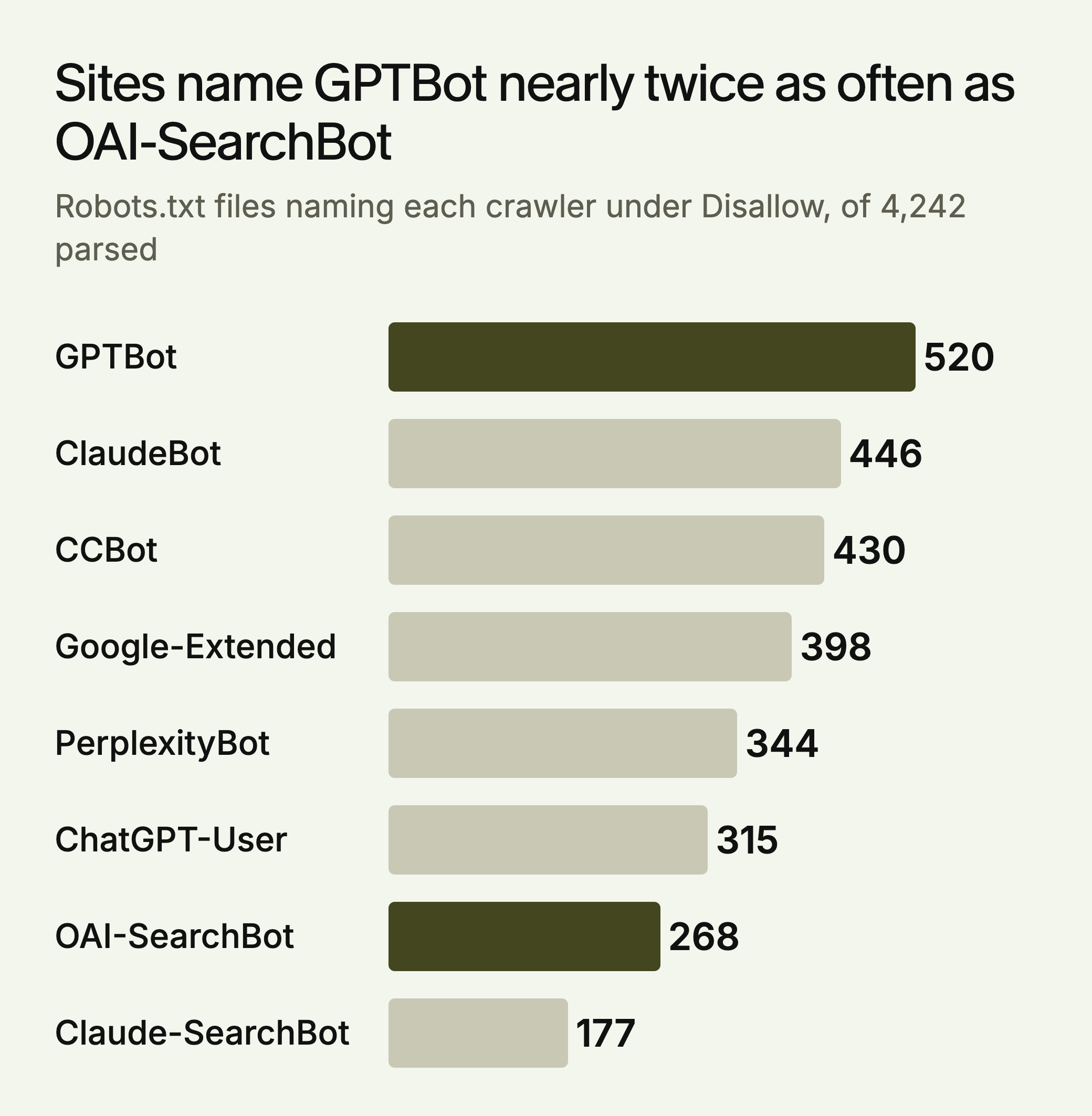
GPTBot is named nearly twice as often as OAI-SearchBot, which fits sites treating training and search differently. Three limits apply. The files come from a sample of top domains, so they don’t describe the whole web. A count includes rules that cover only some paths: 8.11% of files fully disallow GPTBot, or about 344 of the 4,242 by our arithmetic, but there’s no matching figure for OAI-SearchBot. And TechnologyChecker treats September as provisional, because the sample appears to have changed that month.
So this data can’t tell you how many sites block search by accident. It does show what to look for. If your file is among those naming OAI-SearchBot or Claude-SearchBot, confirm that someone chose that on purpose.
Which Policy Fits Your Site
These defaults are our judgment. Training is a policy decision, and search is usually a visibility decision.
| Site | Training crawlers | Search crawlers | User-triggered fetchers |
|---|---|---|---|
| Publisher or paywalled content | Block, unless you have a licensing deal | Allow if you want AI referrals | CDN rules for paid content, since robots.txt may not apply |
| Ecommerce | Your call. Product pages are public marketing | Allow | Allow |
| B2B or SaaS | Your call | Allow | Allow |
| Developer docs | Usually allow | Allow | Allow, since agents read docs for users |
| Staging or private | Require a login | Require a login | Require a login |
How Wildcard Disallow Rules Create Silent Citation Blocks
Under the robots.txt standard (RFC 9309), a crawler with no group of its own follows the User-agent: * group. Most wildcard rules only protect a few paths, and that is fine:
User-agent: *
Disallow: /wp-admin/
Disallow: /private/
The problem is a full-site wildcard with an exception for the one crawler the author had in mind:
User-agent: *
Disallow: /

User-agent: Googlebot
Allow: /
Here Googlebot can crawl everything, and OAI-SearchBot, Claude-SearchBot and PerplexityBot are all blocked without being named. This pattern is worth looking for on staging sites that went live and on sites that were locked down during a migration.
robots.txt isn’t the only layer. Cloudflare’s Bot Preference Sync applies only when it’s turned on. It can then prepend Disallow rules for AI crawlers to your file, based on your Search, Agent and Training policies. Setting Training to Disallow also enables edge blocking of AI training crawlers, though Cloudflare excludes mixed-use crawlers from that block. Firewall rules can block a bot that your robots.txt allows.
Four Robots.txt Rules That Catch People Out
- A server error can mean a full block. If robots.txt returns a 5xx, RFC 9309 says the crawler “MUST assume complete disallow.” A 404 means the reverse: crawlers may fetch anything. Check the status code as well as the contents.
- Bot names ignore case, and paths don’t.
gptbotmatches GPTBot, butDisallow: /Private/doesn’t cover/private/. - Repeated groups merge. Two groups for the same bot are combined, so a forgotten Disallow lower down in a long file still applies.
- The longest match wins. With
Disallow: /blog/andAllow: /blog/guides/, pages under/blog/guides/are allowed. If an Allow and a Disallow tie, the standard says Allow should be used.
Reading Your Current robots.txt for AI Citation Impact
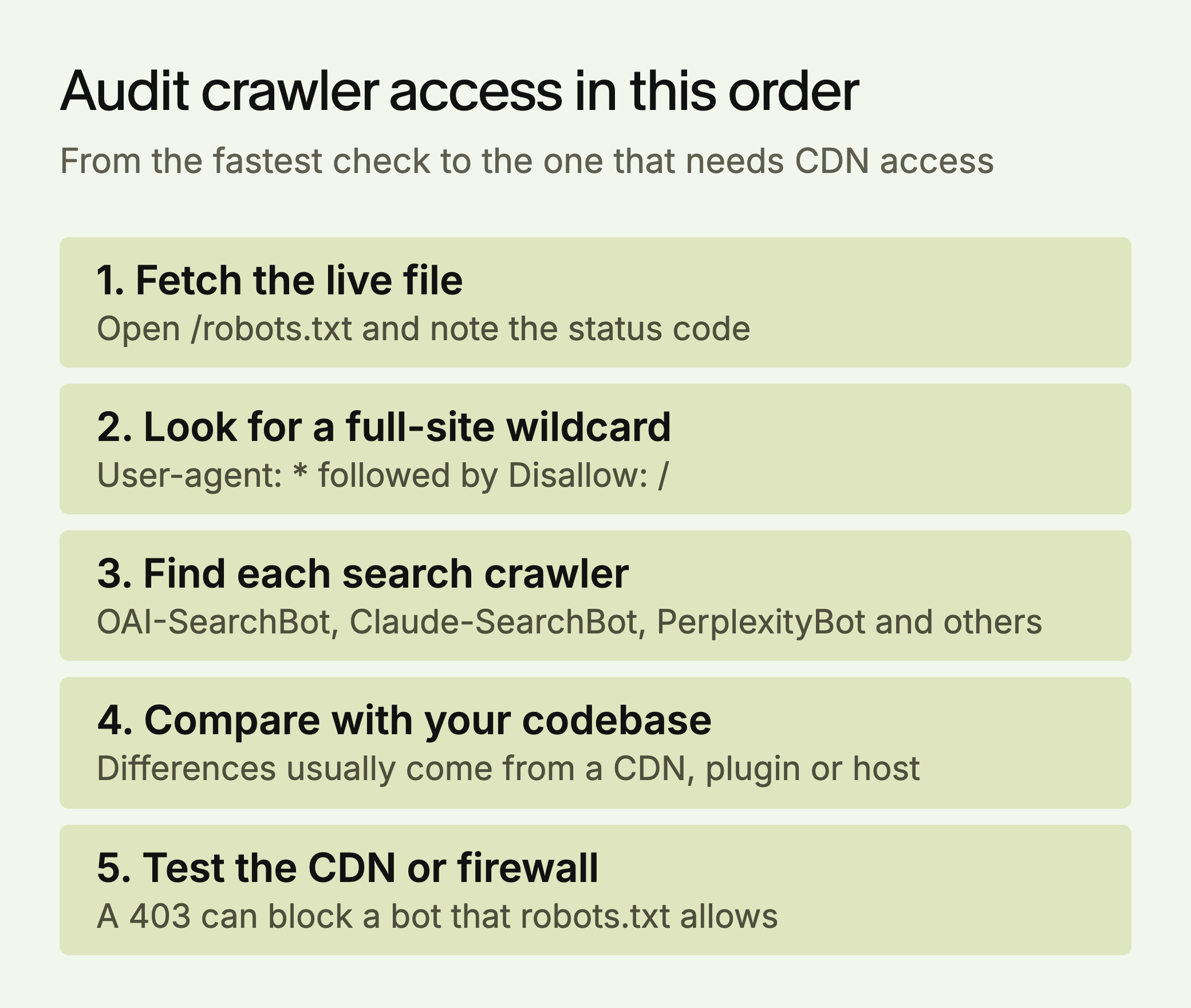
Open yourdomain.com/robots.txt and look for three things:
Explicit blocks. Search for each user agent in the table above. Disallow: / under a training crawler is a policy choice. Disallow: / under OAI-SearchBot, Claude-SearchBot, PerplexityBot, meta-webindexer or Amzn-SearchBot can take you out of that platform’s search.
A full-site wildcard. If User-agent: * is followed by Disallow: /, every crawler without its own group is blocked. Either limit the wildcard to specific paths or add a group for each search crawler.
Rules you didn’t write. Compare the live file with the one in your codebase or CMS. Differences usually come from a CDN, a security plugin or the host.
A Configuration That Separates Training From Search
This blocks training and leaves search open. Remove the Google-Extended group if you want to stay available for Gemini grounding.
# Opt out of AI training
User-agent: GPTBot
Disallow: /

User-agent: ClaudeBot
Disallow: /

User-agent: CCBot
Disallow: /

User-agent: Google-Extended
Disallow: /

User-agent: meta-externalagent
Disallow: /

User-agent: Amazonbot
Disallow: /

# Allow search crawlers
User-agent: OAI-SearchBot
Allow: /

User-agent: Claude-SearchBot
Allow: /

User-agent: PerplexityBot
Allow: /

User-agent: meta-webindexer
Allow: /

User-agent: Amzn-SearchBot
Allow: /

User-agent: Googlebot
Allow: /

# Everyone else
User-agent: *
Disallow: /wp-admin/
Disallow: /wp-login.php
A crawler with its own group follows that group instead of the wildcard, so the named crawlers above ignore the wildcard rules. If you want them kept out of admin paths too, repeat those lines in each group. robots.txt is a request and not a lock. Cloudflare’s documentation notes that “robots.txt compliance is voluntary,” so use server or CDN rules for anything that must stay private.
Verifying AI Crawler Access After Configuration Changes
Changes aren’t instant. OpenAI says search can take about 24 hours to adjust after a robots.txt update, and Amazon gives a similar figure. Google says recrawling for preview controls “can take anywhere from several days to several months.” The robots.txt standard says crawlers shouldn’t rely on a cached copy for more than 24 hours, unless the file is unreachable.
Check in this order:
- Syntax. Search Console’s robots.txt report shows which files Google found, when it last checked them and any parsing errors. Google documents no check for other user agents there. For Googlebot and a specific URL, use the URL Inspection tool.
- Rules for other bots. Test locally with Google’s open source robots.txt library, or read the groups by hand.
- Firewall behavior. Run
curl -I -A "OAI-SearchBot" https://yourdomain.com/. A 403 suggests a block by user agent. This is only a rough test, because bot rules based on IP address will treat your request differently. - Server logs. Look for search crawlers by user agent over the following weeks. Crawlers visit on their own schedule, so a quiet day proves little. Weeks of no visits, on a site that used to get them, are worth investigating. User agents can be faked, so check real hits against the IP lists OpenAI publishes for GPTBot, OAI-SearchBot and ChatGPT-User.
Recheck It When the Bot List Changes
Crawler lists change, so robots.txt needs an occasional review. Put a check in the calendar once a quarter, and repeat it after any CDN, security plugin or hosting change.
Priorities, in order: make sure the search crawlers you want are allowed, decide your training policy and write it down, then confirm in your logs that the crawlers are actually arriving. Blocking a search crawler is one of the few settings that can remove you from a platform’s search by itself, so check it before you work on content.
LLMagnet measures AI visibility across seven engines, so you can see whether a crawler change shows up in the answers, and its agent prepares fixes for your approval. The free audit is a place to start.


 Gemini





 30-day free trial · no credit card