

 Ask Claude

An MCP server lets AI agents query your data and take actions through a standard protocol, but we’d have most businesses fix crawl access and page content first. Agents also read ordinary web pages, so not having an MCP server doesn’t make you invisible to them.
We think MCP matters most for businesses with something an agent can do: check stock, get a quote, book a slot. This post covers what a server exposes, how it relates to llms.txt and WebMCP, and the order to build in.
Contents
- What MCP Is
- How AI Agents Differ from Search Crawlers
- How a Tool Call Works
- What an MCP Server Looks Like for a Business
- A Worked Example: One Read-Only Tool
- Common Mistakes
- llms.txt: A Map, Not a Citation Tool
- WebMCP: The Browser Layer
- Sitemap, llms.txt, MCP and WebMCP Compared
- The Measurement Gap
- The Build Order
- Conclusion
- FAQ
What MCP Is
The Model Context Protocol is an open standard that Anthropic released in November 2024 to give AI assistants a common way to connect to tools and data. Its messages follow JSON-RPC 2.0.
In December 2025, Anthropic donated MCP to the Agentic AI Foundation, a directed fund under the Linux Foundation co-founded by Anthropic, Block and OpenAI, with support from Google, Microsoft, AWS, Cloudflare and Bloomberg. Anthropic reported more than 10,000 active public servers and 97 million monthly SDK downloads at that time, and said ChatGPT, Cursor, Gemini, Microsoft Copilot and VS Code support MCP. Those are Anthropic’s own figures, and SDK downloads count developers and automated builds, not customers.
The sitemap comparison only goes so far. A sitemap lists pages for a crawler. An MCP server runs tools: an agent can call one and get a live answer or complete an action. And Google can usually discover most of a well-linked site without a sitemap, just as agents can often use your site without an MCP server.
How AI Agents Differ from Search Crawlers
OpenAI’s crawler documentation shows the distinction well. OAI-SearchBot is used to surface sites in ChatGPT’s search features. GPTBot crawls content that may be used for training. ChatGPT-User visits a page when a user’s request calls for it. OpenAI treats these as independent settings, so you can allow search and refuse training.
Agents that carry out tasks can work in two ways. They can call a structured tool, or they can operate the page itself, clicking and reading as a person would. Chrome’s team describes WebMCP as more reliable than raw DOM actuation, which is the second approach. So your page content, forms and accessibility still matter to agents.
We don’t know of reliable public data on how much traffic comes from agents, so check your own logs.
How a Tool Call Works
The flow is short, and it shows why your tool descriptions matter so much.
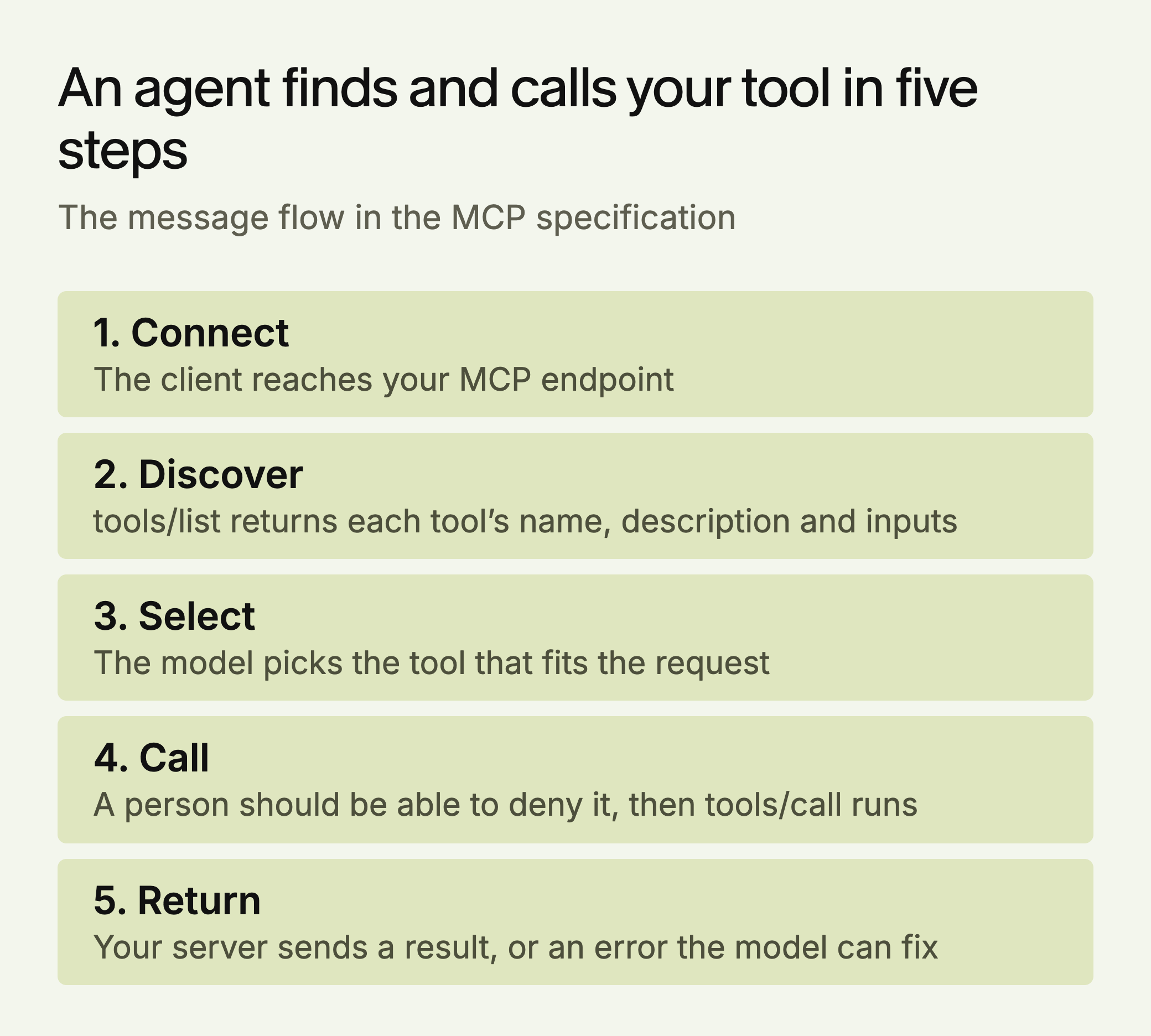
The model never sees your database. It sees the name, description and inputs you wrote, and it chooses on that basis. A public business server would normally use Streamable HTTP, one endpoint such as https://example.com/mcp that accepts POST and GET.
What an MCP Server Looks Like for a Business
The specification defines three things a server can expose: resources, prompts and tools. For most businesses the tools are the point, and they fall into two groups:
- Read tools: product search, price lookups, availability checks, knowledge base search. These return current data instead of whatever a model last saw.
- Action tools: booking, quote generation, checkout. These need authentication. The specification also requires servers to validate inputs, apply access controls and rate-limit tool calls.
The specification also says there should always be a human able to deny a tool call, so design action tools with a confirmation step.
Authorization is optional in the specification, but any tool tied to a customer needs it. HTTP servers that support it should follow the specification’s OAuth 2.1 profile. Tokens must not travel in the URL, servers must check that a token was issued for them, and they must not pass a client’s token on to another API. Streamable HTTP servers must also validate the Origin header to block DNS rebinding attacks.
Before you build, check whether your platform already provides one. Shopify documents MCP tools for catalog search, carts, checkout and orders, and says only trusted agents can complete a checkout directly. Other agents hand the buyer to the store to pay. Look in your own vendor’s documentation, and search the official MCP Registry for existing servers. If nothing exists, start with one read-only tool on your most-asked question.
A Worked Example: One Read-Only Tool
The company below is made up for illustration. Tolvane Physio runs three clinics, and its most-asked question is whether anyone can be seen this week. That is a live fact, so a static page can’t answer it well and a read tool can.
{
  "name": "get_open_appointments",
  "title": "Find open physiotherapy appointments",
  "description": "Returns open slots at Tolvane Physio clinics for the next 14 days. Use when someone asks whether they can be seen soon. Does not book.",
  "inputSchema": {
    "type": "object",
    "properties": {
      "clinic": { "type": "string", "enum": ["north", "harbour", "central"] },
      "from_date": { "type": "string", "description": "YYYY-MM-DD, today or later" }
    },
    "required": ["clinic", "from_date"]
  }
}
Three details do the work. The description says when to use the tool and what it won’t do. The inputs are constrained, so an invented clinic fails validation. And a past date gets a result with isError: true and a message such as “from_date must be today or later,” which the specification treats as an execution error the model can correct and retry.
To test it, connect the server to a client and ask, “Can I see someone at the harbour clinic on Friday?” It worked if the right tool ran with the right arguments and the answer matches your calendar. Tolvane would add a booking tool only after real calls show demand, and then with authentication and a confirmation step.
Common Mistakes
- Wrapping your whole API. Every extra tool is one more option for the model to choose between.
- Writing vague descriptions. “Gets data” gives a model nothing to choose on. Say what it returns and when to use it.
- Treating annotations as security. The specification tells clients to treat tool annotations as untrusted unless the server is trusted. Enforce permissions on your server.
- Returning protocol errors for bad input. Input and business-rule failures belong in the result with
isError: true. Protocol errors are harder for a model to recover from.
llms.txt: A Map, Not a Citation Tool
Don’t expect citations from llms.txt. SE Ranking’s study of nearly 300,000 domains (vendor data) found no measurable link between having the file and being cited. Google’s AI optimization guide says you don’t need AI text files to appear in Google Search, and that Google Search ignores them.
It may still give agents a useful map. Chrome’s Lighthouse has an llms.txt audit in its experimental Agentic Browsing category, and describes the file as optional. That audit only flags a server error when the file is requested, and it doesn’t address rankings or citations.
If you publish one, keep it short: your key pages, your API documentation, and your MCP endpoint if you have one.
WebMCP: The Browser Layer
WebMCP lets a website expose structured tools to agents working in the browser. Chrome opened an early preview in February 2026, with a declarative API for standard HTML forms and an imperative API for interactions that need JavaScript.
Lighthouse’s Agentic Browsing category includes WebMCP checks, and Chrome describes the category and its WebMCP support as experimental and based on proposed standards. We found no evidence that WebMCP affects ranking or citations in any AI search system, so treat it as something to prototype, not a priority.
Sitemap, llms.txt, MCP and WebMCP Compared
| Sitemap | llms.txt | MCP server | WebMCP | |
|---|---|---|---|---|
| What it is | A list of pages | A short map of key pages | Tools on an endpoint | Tools exposed by a page |
| Who uses it | Crawlers | Agents, if they choose to | MCP clients | Agents in the browser |
| Can an agent act? | No | No | Yes | Yes |
| Status | Long established | Optional | Open standard, Linux Foundation fund | Experimental: Chrome origin trial |
| Evidence on citations | Not the point of it | No measurable link | Unmeasured | None found |
The Measurement Gap
Citation tracking tells you how often you appear in AI answers. It doesn’t tell you whether an agent could use your site to finish a task. Add these alongside it:
- Agent fetches: filter your server logs for user-triggered agents such as ChatGPT-User, and record which pages they request. OpenAI publishes IP ranges for its agents, so you can confirm a request is genuine. It also says robots.txt rules “may not apply” to user-triggered visits, so don’t count on robots.txt to stop them.
- Tool calls: if you run an MCP server, log each tool call, its result and any errors.
- Task tests: ask an agent to complete your top three tasks on your site, such as getting a price or booking, and note where it fails.
The Build Order
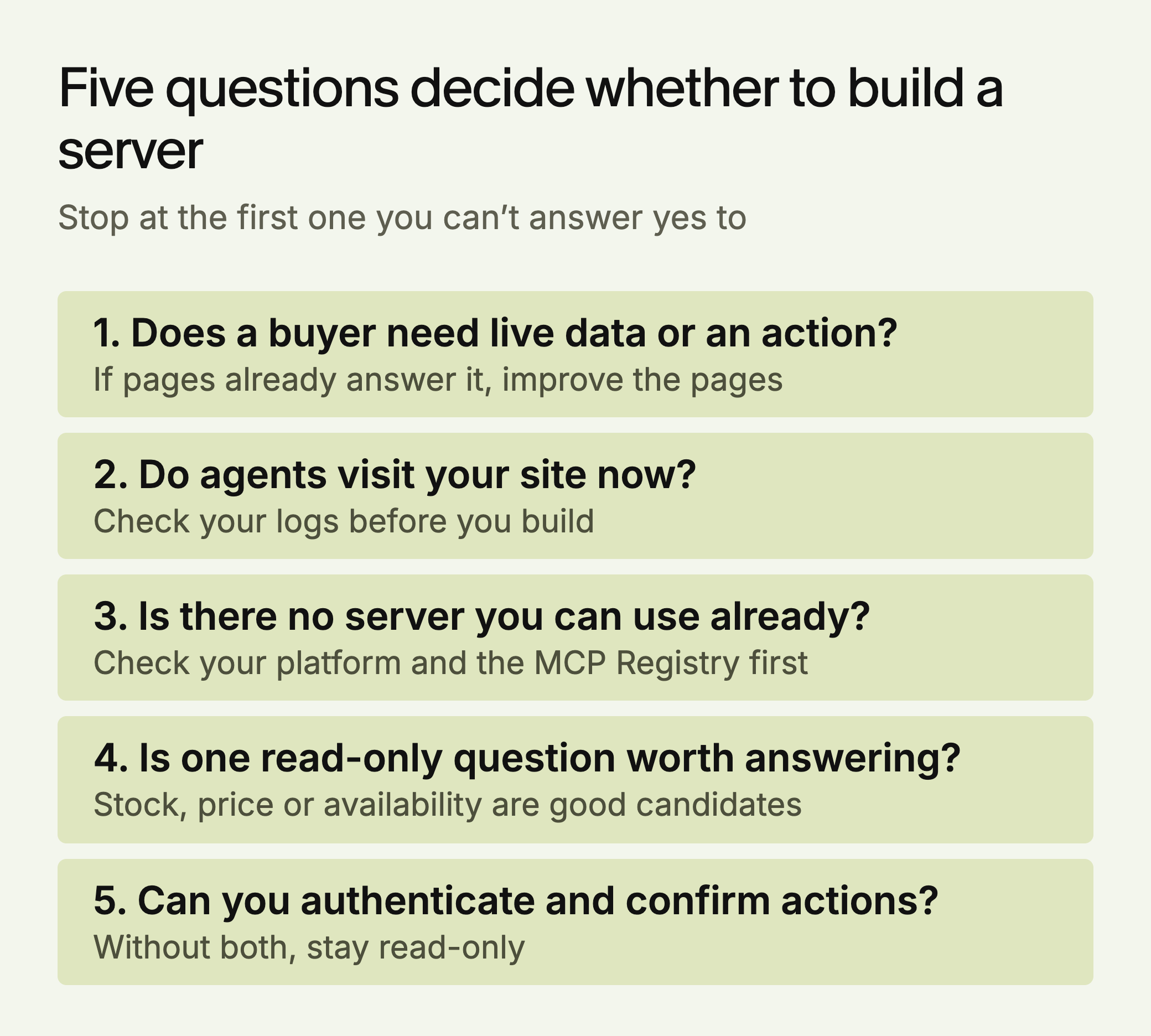
Whatever the answers, this is the order we’d use.
- Fix crawl access. Check your robots.txt and firewall rules for the crawlers you want, and confirm your key pages render without JavaScript. An MCP server doesn’t help a buyer who never hears of you.
- Make pages and forms easy to operate. Clear labels and accessible forms help every agent that works through the page.
- Baseline your agent traffic. Filter your logs now, so you know whether demand exists before you build.
- Look for an existing server. Check your vendor’s documentation and the registry.
- Build one read-only tool if the case is there. Add action tools only with authentication and a confirmation step.
- Add llms.txt if it is cheap. Point it at your key pages and your endpoint, and expect no citation effect.
In our view, the case differs by business. A store on a major platform should check the platform first. A business that books or quotes has the strongest reason to build. A software company with public documentation could start with a read-only documentation search. A publisher or brand site with nothing to transact should put the effort into its pages.
Conclusion
Being cited and being usable are different problems, and the second is earlier and less measured. A business with bookable or purchasable services should test whether an agent can complete those tasks today. Most others can fix the basics first and watch their logs.
LLMagnet measures AI visibility across seven engines and has an agent that prepares fixes for your approval. The free LLMagnet audit shows where AI answers cite you now, which is a sensible place to start.



 Gemini



 30-day free trial · no credit card