

 Ask Perplexity

The right plugin depends on the job: VigIA or LLMagnet for AI files and local crawler logs, MAIO for a scanner and editor tips, LovedByAI for managed page changes, Ayzeo for brand monitoring, Opttab for free scoring, and Airefs for click tracking. We make LLMagnet, so weigh its place in this list with that in mind. The order is not a ranking.
Features, install counts and ratings below come from each plugin’s WordPress.org listing, checked on November 10, 2026. They are the vendors’ own descriptions. Install counts are rounded by WordPress.org, and ratings based on a handful of reviews tell you little.
Set expectations first. A plugin can make your site easier to crawl and show you which bots visit, but no plugin can make an engine cite you. SE Ranking’s study of about 300,000 domains found no measurable link between llms.txt and citations, so don’t expect citations from it. It may still give agents a useful map of your site.
Contents
- The Seven at a Glance
- 1. LLMagnet: AI Files, Bot Logs and Agent Readiness
- 2. VigIA: Widest Crawler Coverage
- 3. MAIO: Scanner and Editor Guidance
- 4. LovedByAI: Managed Page Changes
- 5. Ayzeo: Brand Monitoring
- 6. Opttab: Free GEO Scoring
- 7. Airefs: AI Click Tracking
- How to Choose
- How to Test a Plugin Safely
- How to Read Bot Logs
- FAQ
The Seven at a Glance
| Plugin | Account needed | Where its data goes | Last updated |
|---|---|---|---|
| LLMagnet | No, for the free plugin | Bot logs stay in your database | Sep 29, 2026 |
| VigIA | None listed | Local database table | Nov 9, 2026 |
| MAIO | Optional dashboard | Site details to its API on install or update | Nov 8, 2026 |
| LovedByAI | Yes | Vendor’s cloud | Nov 9, 2026 |
| Ayzeo | For queries and deep scans | Local audit. Page URLs and queries to Ayzeo after you add a token | Oct 31, 2026 |
| Opttab | No, for the free version | Listing conflicts | Dec 23, 2025 |
| Airefs | Yes | Tinybird for processing, AWS in the EU for storage | Oct 14, 2026 |
The “tested up to” version is a quick check: Opttab is the only one here last tested below WordPress 7.0, at 6.9.11, while Airefs is tested to 7.0.8 and the rest to 7.1.4.
Check data flows against your privacy policy before installing. Airefs sets a first-party airefs_session_id cookie. LovedByAI sends a post’s title, excerpt, address and dates when you publish or update it.
1. LLMagnet: AI Files, Bot Logs and Agent Readiness
LLMagnet started as a WordPress plugin. It is now a platform that measures AI visibility across seven engines and has an agent that prepares fixes for approval. The free plugin is the WordPress part of that.
Free plugin features:
- Serves
/llms.txt,/llms-full.txtand markdown versions of pages - Tracks visits from 25 named AI bots, with logs kept in your WordPress database
- AI Visibility Score and page-level readiness scores
- Agent Ready audit, with discovery files such as
mcp.jsonandsecurity.txt - robots.txt management and optional IndexNow pings
- Google Analytics 4 and Search Console connection
- MCP and WordPress Abilities API support on WordPress 6.9 or later, with the MCP Adapter plugin
A separate Pro add-on adds JSON-LD schema tools, WooCommerce analytics, scheduled email reports and one-click audit fixes.
Best for: site owners who want AI files and local bot logs in one plugin, with a paid path to schema and fixes.
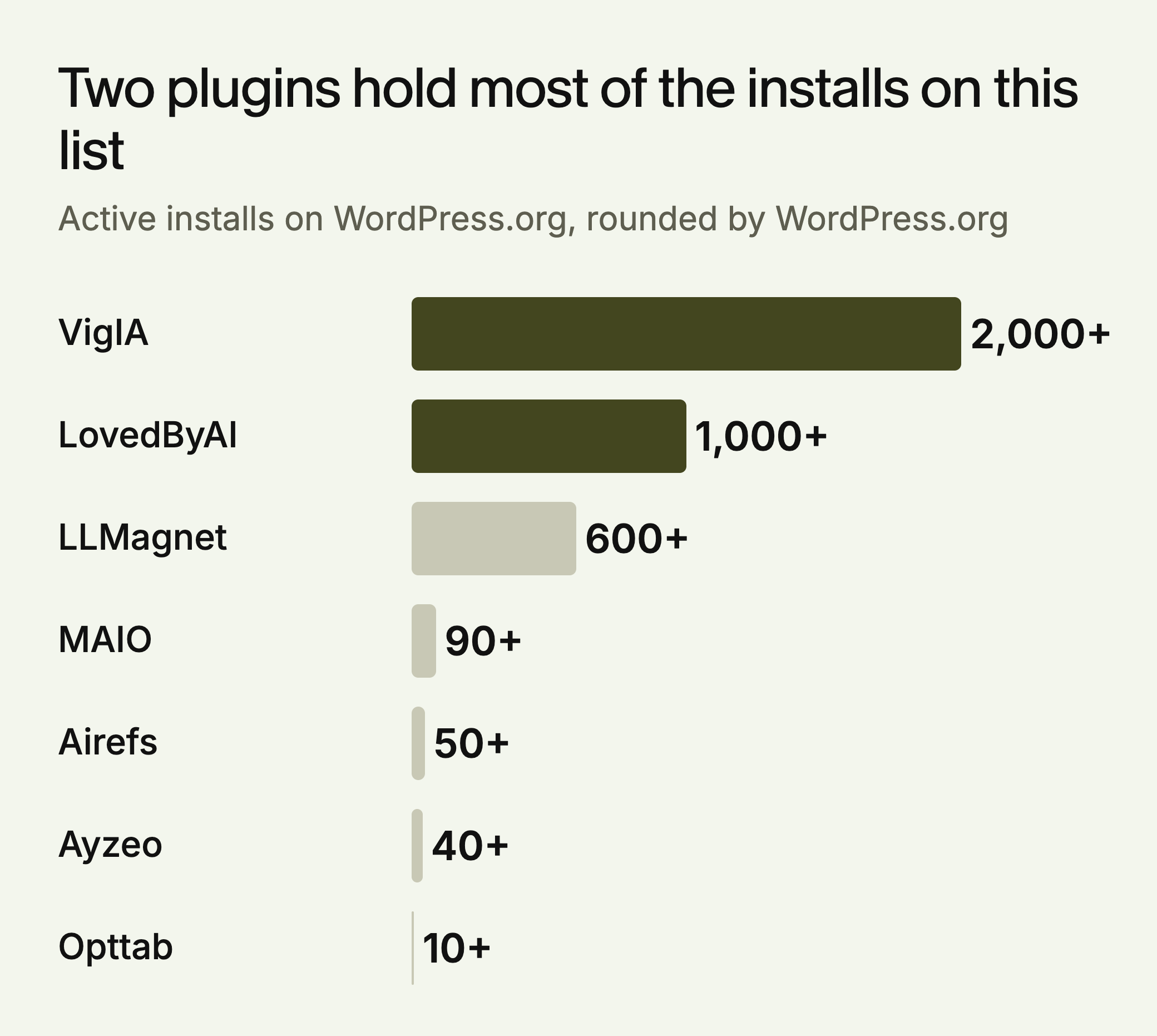
On WordPress.org: 5 out of 5 from 6 reviews, 600+ active installs, version 3.6.0
View LLMagnet on WordPress.org
2. VigIA: Widest Crawler Coverage
VigIA monitors more than 60 AI crawlers, the highest count published by any plugin here, and has the largest install base on this list. It keeps visit data in a local database table.
Key features:
- Generates
llms.txtandllms-full.txt, with content selection and exclusion rules - Markdown endpoints for posts, pages, taxonomy archives and WooCommerce products
- Nine abilities for AI agents through the Abilities API and MCP, covering analytics, blocking and robots.txt
- JSON-LD for WebSite, Organization or Person, and related actions
- 100-point AI visibility analyzer that can check any page, with letter grades
Best for: developers and technical site owners who want broad crawler coverage and agent access. It requires WordPress 6.9 or later.
On WordPress.org: 5 out of 5 from 19 reviews, 2,000+ active installs, version 2.8.5
3. MAIO: Scanner and Editor Guidance
MAIO combines an AI visibility scanner with suggestions inside the post editor.
Key features:
- AI visibility dashboard and scanner covering six pillars
- Checks for JSON-LD, schema types, OpenGraph and llms.txt, and an llms.txt describing your key pages
- AI crawler activity tracking
- AI Insights panel in the Gutenberg, Classic and Elementor editors
- Optional web dashboard through maioai.com
Best for: writers and small teams who want guidance while editing. The plugin sends your site address, software versions and site language to its API on install or update.
On WordPress.org: 5 out of 5 from 4 reviews, 90+ active installs, version 7.3.28
4. LovedByAI: Managed Page Changes
LovedByAI is a service plugin. It needs a lovedby.ai account, and processing and storage happen on the vendor’s cloud. It proposes page-level changes that you can approve, reject or undo.
Key features:
- A separate AI-ready version of each page, linked from the footer
- Headings rewritten as questions, and generated FAQs with FAQPage schema
- llms.txt generation if your site doesn’t already have one
- AI crawler tracking and AI referral analytics
Best for: site owners who want page changes handled for them and are comfortable sending content to a third party. The free tier includes full homepage optimization, crawler monitoring, and impression and visit tracking.
On WordPress.org: 4.4 out of 5 from 5 ratings, 1,000+ active installs, version 2.5.5
View LovedByAI on WordPress.org
5. Ayzeo: Brand Monitoring
Ayzeo combines a local site audit with monitoring of what AI engines say about your brand.
Key features:
- Site Audit with a score per page, run on your server
- AI visibility queries across ChatGPT, Google AI Overviews, Gemini, Perplexity, Claude, Grok and DeepSeek, depending on plan
- Sentiment, visibility share and competitor comparison in the Pro overview
- Publishes AI-optimized content into WordPress as drafts
Best for: marketing teams focused on how engines describe the brand. The audit, llms.txt and robots.txt policy work without an account. Deep scans, visibility queries and content generation need a project on ayzeo.com, and the GEO overview needs a Pro plan.
On WordPress.org: no reviews yet, 40+ active installs, version 1.2.2
6. Opttab: Free GEO Scoring
Opttab’s free plugin offers scoring and file generation without an account or usage limits.
Key features:
- Sitewide GEO score and per-page analysis, with recommendations (free)
- robots.txt, llms.txt and ai.txt generation (free)
- AI visibility tracking, the Studio content generator and campaign management (premium)
Best for: site owners who want a free diagnostic. Before relying on it, check two things. The listing’s statements on data handling conflict, saying both that analysis runs locally and that it needs an internet connection and uses the Opttab API. It also shows the fewest installs here, and its listing was last modified in December 2025.
On WordPress.org: no ratings yet, 10+ active installs, version 2.3.12
7. Airefs: AI Click Tracking
Airefs is an analytics connector. It tracks AI crawler visits and the human visitors who click through from AI answers.
Key features:
- Server-side tracking of AI crawler visits, by AI system and page
- Click tracking by platform, referrer and page, over 7 to 180 days
- Covers ChatGPT, Perplexity, Claude, Gemini, Copilot, Meta AI, Amazon and others
Best for: publishers who already handle AI files elsewhere and want click attribution by platform. It needs a free Airefs account and a per-site token, and analytics are processed and stored outside WordPress. The listing doesn’t mention AI file generation or page scoring.
On WordPress.org: 5 out of 5 from 2 reviews, 50+ active installs, version 1.2.6
How to Choose
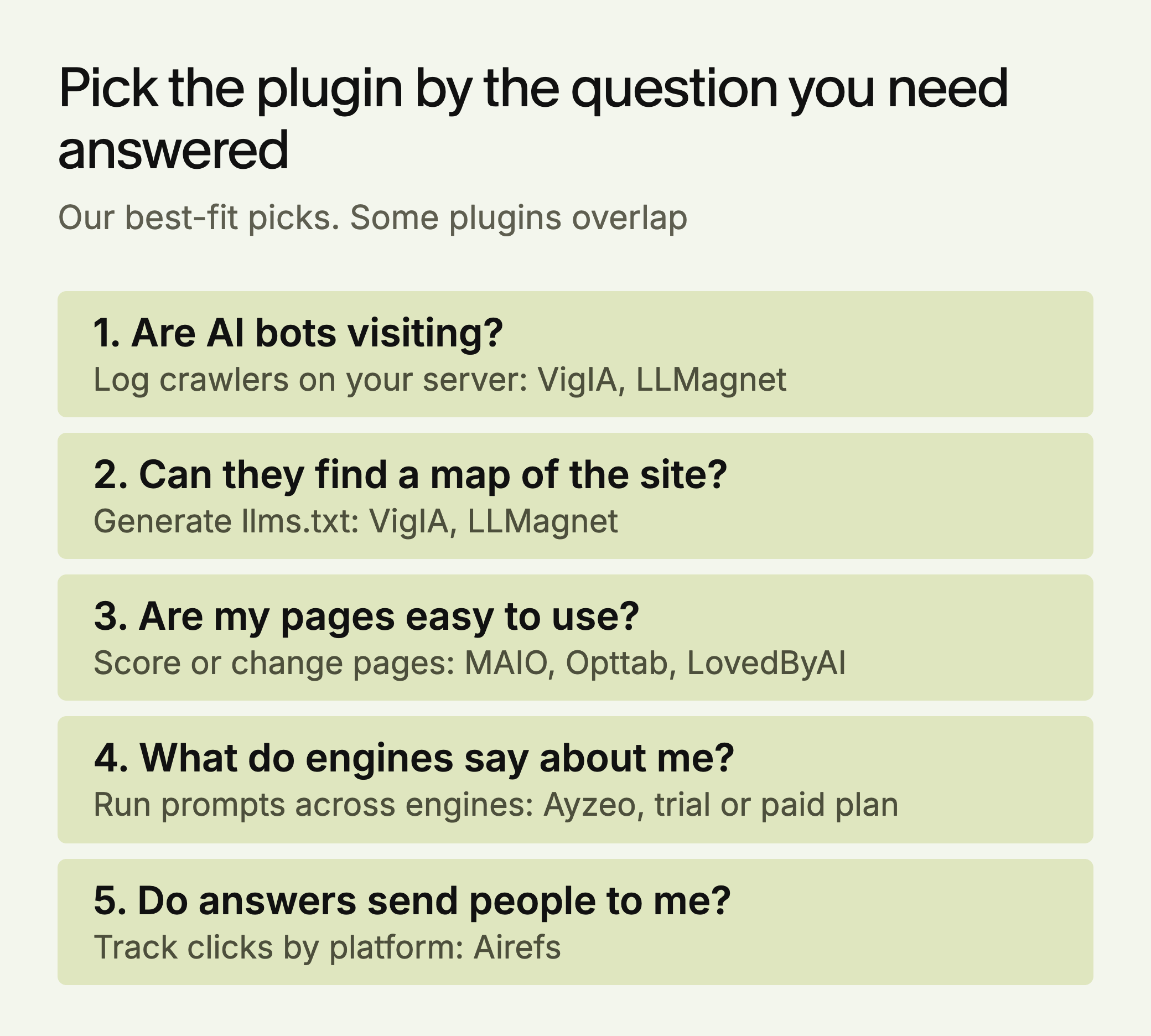
- AI files and local crawler logs: VigIA or LLMagnet. VigIA lists more crawlers, and LLMagnet adds an Agent Ready audit.
- Guidance while writing: MAIO.
- Someone else to handle page changes: LovedByAI, if you accept cloud processing.
- What AI says about your brand: Ayzeo with a trial or paid plan.
- A free score without an account: Opttab, after checking its data handling.
- Clicks by AI platform: Airefs.
Test any combination on staging first, since two plugins that write robots.txt or llms.txt can overwrite each other.
Site size changes the choice. A WooCommerce store should note that VigIA serves markdown for products and that LLMagnet’s WooCommerce analytics are in the Pro add-on. An agency should note that Airefs needs a token per site.
How to Test a Plugin Safely
- Save what exists. On staging, open
/robots.txtand/llms.txtin a private window, as Google suggests for robots.txt, and save both. - Check for physical files. Look in the site root through SFTP or your host’s file manager. WordPress normally generates robots.txt on request through
do_robots(), and plugins can change the output with therobots_txtfilter. - Install one plugin and reload both URLs. Compare them with your saved copies, and confirm your SEO plugin’s rules are still there.
- Give it a day, then read the log. OpenAI says robots.txt changes can take about 24 hours to affect its search results.
VigIA writes physical llms.txt files at the site root by default. LLMagnet serves the file through WordPress, and leaves any physical file in place and serves that instead. With both installed, visitors would get VigIA’s file and LLMagnet’s settings for it would have no visible effect. Choose one plugin to own each file.
How to Read Bot Logs
A visit from an AI company’s bot can mean very different things, going by Perplexity’s documentation and OpenAI’s.
| Bot | What it does | robots.txt |
|---|---|---|
GPTBot | Crawls content that may train OpenAI’s models | Applies |
OAI-SearchBot | Surfaces sites in ChatGPT search | Applies |
ChatGPT-User | Visits a page for a user action in ChatGPT | May not apply |
PerplexityBot | Surfaces and links sites in Perplexity results | Applies |
Perplexity-User | Visits a page to help answer a user | Generally ignored |
So a GPTBot hit says nothing about ChatGPT search, and blocking it is an opt-out from training, not from answers. A ChatGPT-User hit is closer to real demand, since a person’s action triggered it.
User-agent names can be copied. OpenAI and Perplexity publish IP ranges, and Perplexity advises matching both the name and the IP. Ask any plugin whether it checks IPs, because a count based only on the name can include impostors.
Bot logs show crawling, not citation. To see whether engines mention your brand, you need to test prompts across engines. LLMagnet does this across seven engines, and you can start with the free AI visibility audit.






 Ask Claude


 30-day free trial · no credit card