

 Ask Claude

An agent-ready website has five layers, and in our view most businesses need only the first one this year: crawlers and agents that can reach and read your pages. MCP, Agent Cards and x402 pay off only when agents need to query your data, delegate work to you or pay you per request, and llms.txt is a small job with no proven effect on citations.
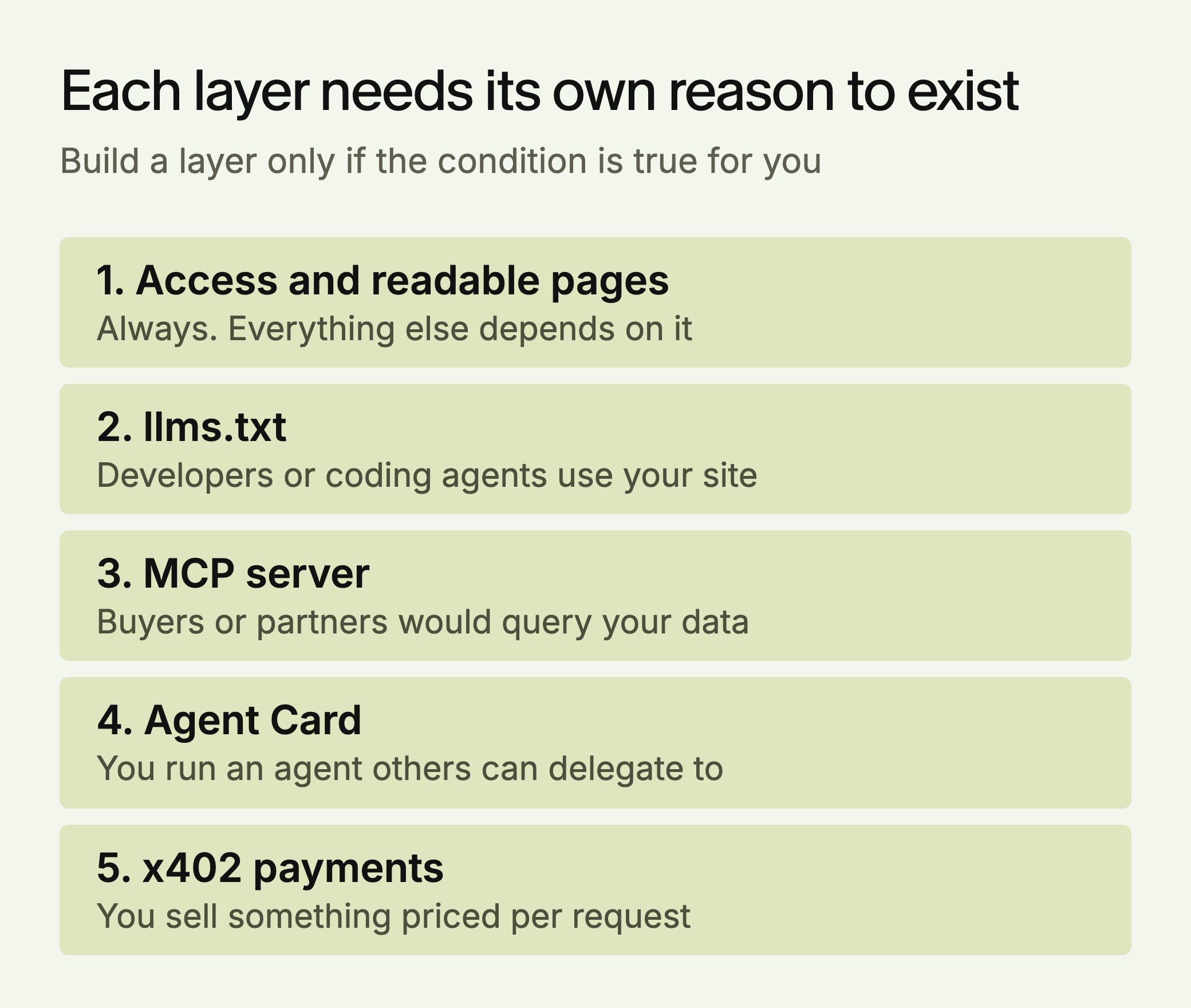
Each layer handles one step in how an agent deals with a business: reaching it, finding a map of it, calling it, discovering what it can do, and paying it. The sections below say what each one involves, what the evidence shows, and the smallest useful version.
Contents
- What Agent-Ready Means
- Layer 1: Access and Readable Pages
- Layer 2: llms.txt
- Layer 3: An MCP Server
- Layer 4: An Agent Card
- Layer 5: x402 Payments
- Three Worked Examples
- How to Tell Each Layer Worked
- Common Mistakes
- The Order to Build Them
What Agent-Ready Means
An agent-ready site can be read and used by software acting for a person. That’s a separate goal from being cited. A page can earn citations in ChatGPT and still be unusable by an agent trying to check stock or place an order. The first two layers help with reading. The last three matter only if agents need to do something with you.
| Layer | What it does | Typical work | Build it if |
|---|---|---|---|
| 1. Access and readable pages | Lets bots reach and read you | Hours, more if pages need server rendering | Always |
| 2. llms.txt | Offers a map of the site | Under an hour | Developers or coding agents use your site |
| 3. MCP server | Lets AI applications call your tools | Days to weeks | Buyers or partners would query your data |
| 4. Agent Card | Describes an agent you run | Hours, once the agent exists | You run an agent others delegate to |
| 5. x402 | Lets software pay per request | Days, plus finance and tax review | You sell something priced per call |
The work estimates are our own. The conditions are the part to take seriously: a layer with no one on the other end is a cost with no return.
Layer 1: Access and Readable Pages
If bots can’t reach your pages, nothing else counts. Most sites aren’t blocking them: Ahrefs’ analysis of about 140 million websites, published in May 2025, found 5.89% blocked GPTBot and 5.74% blocked ClaudeBot, mostly through blanket rules. Only 0.50% and 0.28% named those bots explicitly. The data is over a year old, so check your own file. It also counts robots.txt rules only and leaves out firewall and IP blocks, so a clean file doesn’t prove that bots get through.
Blocking is more specific than most guides suggest, because each company runs bots with different jobs:
- OpenAI: OAI-SearchBot decides whether you can appear in ChatGPT search. GPTBot is for model training. ChatGPT-User visits when a person asks.
- Anthropic: Claude-SearchBot supports search, Claude-User fetches pages for a person, and ClaudeBot collects training data.
- Perplexity: PerplexityBot builds its index and follows robots.txt.
- Google: AI Overviews use normal Googlebot access. Google-Extended is a control token for Gemini training and grounding, and Google says it doesn’t affect inclusion in Search.
What to do this week: Open yourdomain.com/robots.txt and check those names and any User-agent: * rules. Blocking training bots while allowing search bots is a valid choice. Then view the raw source of your pricing, product and service pages. If the facts are missing from the HTML, a crawler that doesn’t run JavaScript won’t see them, so render them on the server.
A common setup allows search and blocks training:
# Appear in AI search
User-agent: OAI-SearchBot
Allow: /

User-agent: Claude-SearchBot
Allow: /

User-agent: PerplexityBot
Allow: /

# Opt out of model training
User-agent: GPTBot
Disallow: /

User-agent: ClaudeBot
Disallow: /
Two details from OpenAI’s crawler documentation are worth knowing. It can take about 24 hours for a robots.txt change to reach its search systems. And robots.txt rules may not apply to ChatGPT-User, because those fetches start with a person.
How to tell it worked: Your server or CDN logs should show 200 responses for those bots on your key URLs. Anyone can fake a user agent, so match the requests against the IP lists OpenAI publishes, such as openai.com/searchbot.json. If robots.txt allows a bot and your logs show 403s or challenge pages, the block is in your firewall.
Layer 2: llms.txt
llms.txt is a proposed markdown file at the root of a site, with a short summary and links to key pages. It’s a map, and it has no allow or block rules. Access control stays in robots.txt.
The evidence for it is weak. SE Ranking’s study of about 300,000 domains found no measurable link to citations. Ahrefs’ May 2026 log study of 137,210 domains found about 28% published the file, an upper bound because its customers skew technical, and about 97% of those files got no requests at all that month. AI bots made up at most 19.5% of the requests that did occur. Ahrefs calls that the largest single bucket, but its own table puts SEO audit tools higher, at 21.7%. Ahrefs says coding agents such as Claude Code are the closest thing the file has to an intended audience.
Don’t expect citations from it. It may still give agents a useful map, especially if developers use your docs. The smallest version is one file linking to your five most important pages, with a sentence on each.
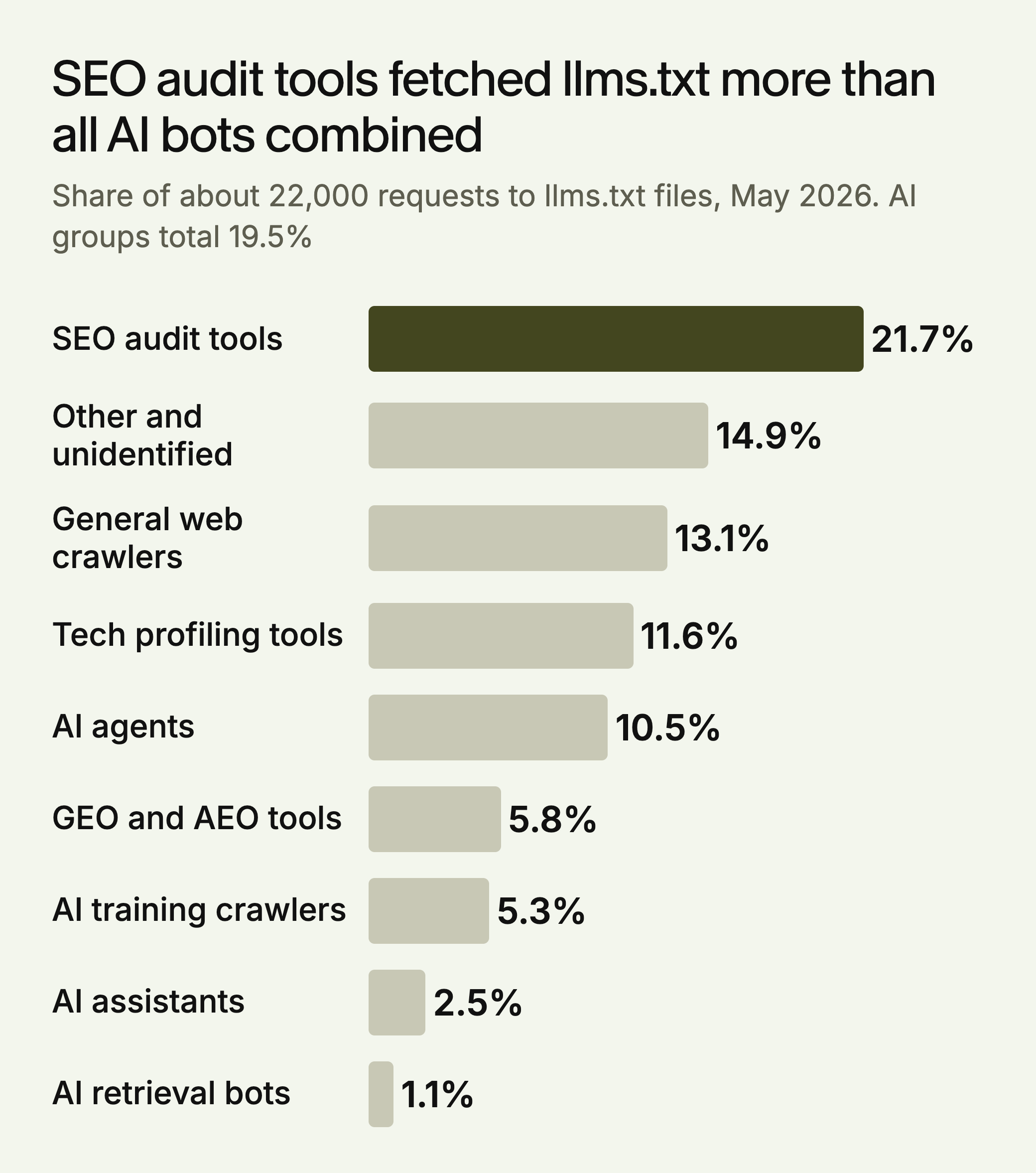
Even those fetches are a ceiling, because Ahrefs notes that a fetch doesn’t prove anything read the file. The format is simple. Under the proposal, only an H1 with the site’s name is required. A summary in a blockquote and H2 sections of links are optional. The business below is made up for illustration:
# Harlow Freight

> Harlow Freight ships palletized goods across the UK.
> Prices and lead times are updated weekly.

## Key pages

- [Pricing](https://example.com/pricing): Rates by pallet size and region
- [Lead times](https://example.com/lead-times): Delivery windows by postcode
- [API docs](https://example.com/docs): Tracking and quote endpoints
Check your logs after a quarter. If the file has had no requests, stop maintaining it.
Layer 3: An MCP Server
The Model Context Protocol lets an AI application call defined tools on your system, such as a catalog search or stock check. Anthropic reported more than 97 million monthly SDK downloads and over 10,000 active public servers in December 2025, when it moved MCP to the Agentic AI Foundation under the Linux Foundation.
Enterprise use is real but early. In Stacklok’s survey of 100 senior technical leaders at large software companies (December 2025, vendor data), 26% were in limited production and 19% in broad production. Another 30% were piloting.
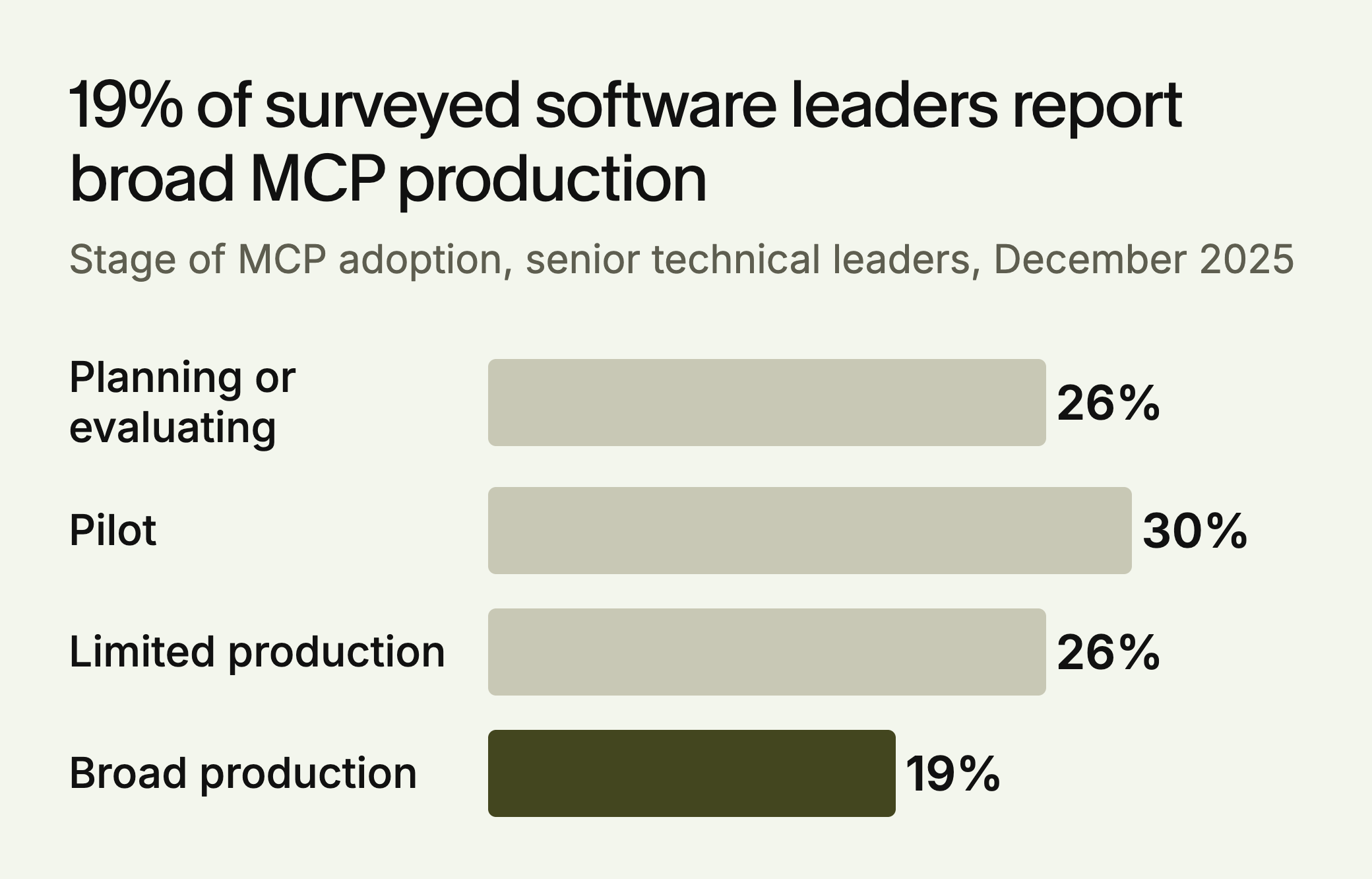
Software companies are the most advanced group in that survey. Across all three industries it covered (software, financial services and retail), broad production was 12%. When the software leaders were asked what was slowing them down, 64% named security, ahead of cost at 40% and legacy integration at 38%. Another 36% named proving business value.
An MCP server only helps once someone connects to it, so it’s worth building if buyers, partners or their tools would use your data this way. The smallest useful version has three read-only tools: catalog, current pricing, and availability. Add write actions later, with authentication and logging.
Under the MCP specification, a client discovers tools with tools/list and runs one with tools/call. Each tool needs a name, a description and a JSON Schema for its inputs. The description is what helps the model pick the right tool, so write it for a reader who has never seen your product:
{
  "name": "check_availability",
  "description": "Get current stock and lead time for one SKU. Read-only.",
  "inputSchema": {
    "type": "object",
    "properties": { "sku": { "type": "string" } },
    "required": ["sku"]
  }
}
The specification says servers must validate inputs, apply access controls, rate limit calls and sanitize outputs. It says there should always be a person able to deny a tool call. Return bad input as a tool result with isError: true and a plain message, since the specification notes that models can use that feedback to correct themselves and try again.
The decision differs by business. A distributor whose buyers check stock many times a week has a real reason to build. A retailer with a good product feed may get more from fixing the feed. A consultancy with a brochure site has nothing to expose.
Layer 4: An Agent Card
An Agent Card is a JSON file that describes an agent using the Agent2Agent (A2A) protocol. It’s published at /.well-known/agent-card.json. Older guides give agent.json, so check the current spec, now at version 1.0.
A2A and MCP do different jobs. MCP connects an AI application to tools. A2A lets one agent delegate work to another. A card describes an A2A agent, so you need one only if you run an agent others can hand tasks to.
The spec requires name, description, supportedInterfaces, version, capabilities, defaultInputModes, defaultOutputModes and skills. Each skill needs an id, name, description and tags. Authentication is declared in securitySchemes and securityRequirements. To test it, fetch the URL, confirm a 200 response with JSON, then run the declared authentication against your live endpoint.
The well-known URL is only one of three discovery routes the spec lists. The others are curated registries and direct configuration, where a partner is simply given the card’s URL. For most business partnerships, direct configuration is the realistic path. Clients must send an A2A-Version header, and requests without one are treated as version 0.3, so check how your server handles them. Signing a card with JSON Web Signature is optional, and clients should verify at least one signature before trusting a signed card.
Layer 5: x402 Payments
x402 uses the HTTP 402 status code so software can pay for a request. The server replies with payment terms, the client pays in crypto (the Stripe and CoinGecko examples below use the stablecoin USDC), and it retries with proof of payment.
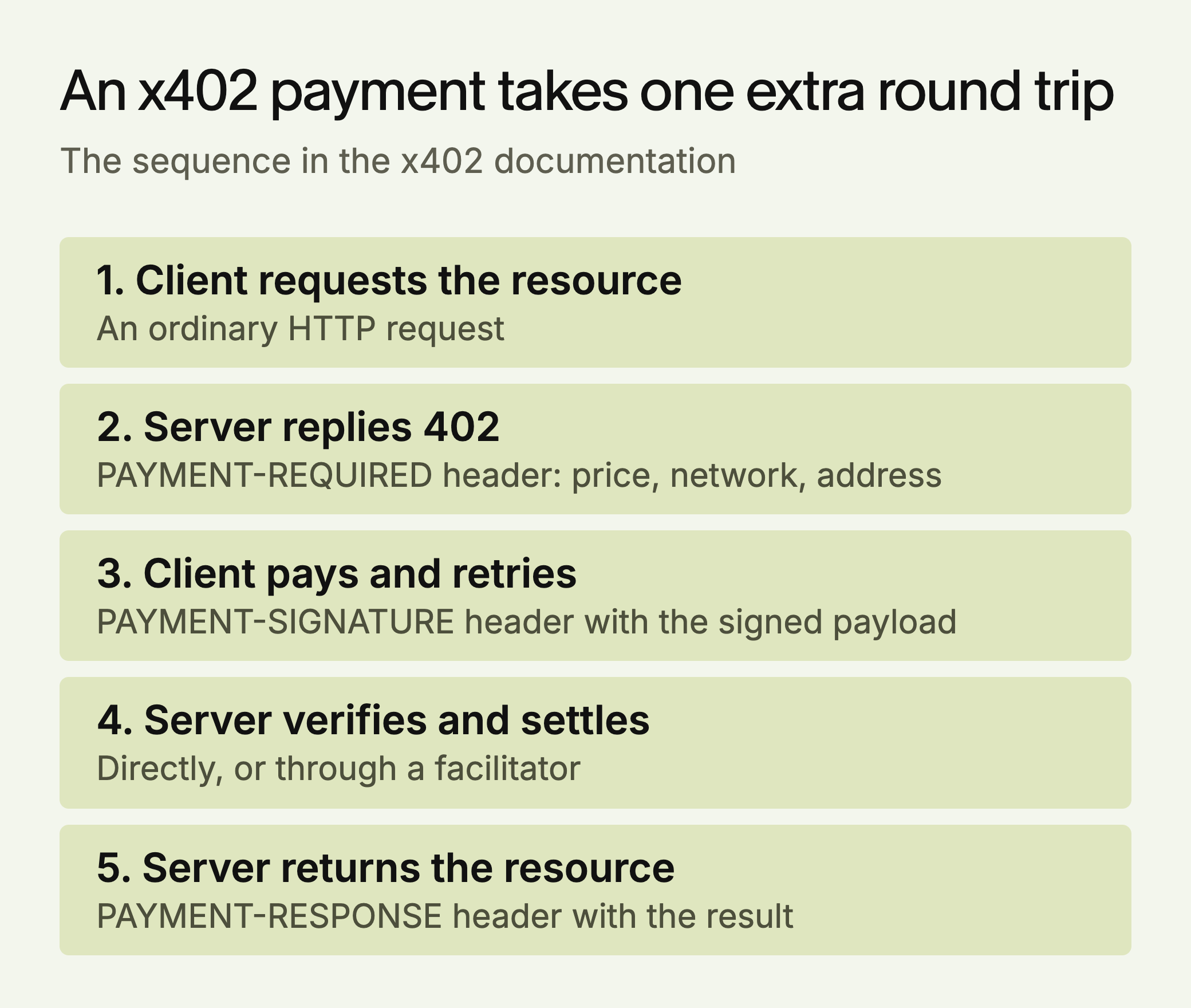
The x402 documentation says each header carries Base64-encoded data. A facilitator verifies and settles payments for you, and the documentation says it doesn’t hold funds. Live facilitators support networks including Base, Solana and Polygon, while the public x402.org facilitator is meant for development and testnets. The docs say the protocol has no fees built in, which doesn’t cover what a facilitator or network may charge.
The infrastructure is getting serious backing. Stripe launched a preview in February 2026 on Base. Forkast reports that the x402 Foundation launched under the Linux Foundation in April 2026, with members including Coinbase, Cloudflare, Google, Stripe, Visa and Mastercard. CoinGecko charges $0.005 USDC per request on its experimental endpoints.
Be careful with the usage numbers. Forkast cites 169 million cumulative transactions on Base by July 2026 and $600 million in annualized volume across all chains, without giving a source for either. The same article reports Artemis’s estimate that about half of transactions are artificial, and CoinDesk’s estimate that real settlement is closer to $28,000 a day.
For most businesses this is one to watch. Consider it if you sell data or a service priced per call, and agents could reasonably buy it without a contract. At CoinGecko’s price of $0.005, 1,000 calls bring in $5, so this only makes sense where calls are numerous or each one is worth a lot. If your buyers are repeat customers on contracts, API keys and monthly billing are simpler. Ask your finance team how stablecoin revenue will be recorded before you build anything.
Three Worked Examples
The companies below are made up for illustration. The right answer changes with what each one sells.
| Business | Needs | Skips | Why |
|---|---|---|---|
| Fernhill Legal, a regional law firm | Layer 1 | Layers 2 to 5 | It needs to be found and read. Nobody needs to call its systems. |
| Tarn Supply, a B2B parts distributor | Layers 1 and 3 | Layers 2, 4 and 5 | Buyers’ procurement tools check stock and pricing, and sales happen on contracts. |
| Quantile Data, which sells market data by API | Layers 1, 2, 3 and 5 | Layer 4 | Developers read its docs, agents can query it, and each call has a price. It runs no agent of its own. |
How to Tell Each Layer Worked
| Layer | Test | Pass | Track |
|---|---|---|---|
| Access | Check logs and view raw HTML | 200s for named bots, facts in the first response | Bot hits on key pages, citations by engine |
| llms.txt | Fetch the file | 200, markdown, every link resolves | Requests per month |
| MCP | Connect one client and ask three real questions | The right tool runs, and bad input returns an error the model can use | Connected clients, calls per tool |
| Agent Card | Fetch the card and run its authentication | 200, JSON, required fields, working auth | Tasks delegated by partners |
| x402 | Pay on a testnet | 402, then 200 with a settlement result | Paid calls, failed settlements |
Common Mistakes
- Using llms.txt for access control. It’s a map with no allow or block rules. People make this mistake because the name looks like robots.txt.
- Blocking every bot from one company. Search and training run on separate bots, so a single rule can remove you from search when you only meant to opt out of training.
- Building MCP because competitors announced one. Ask who would connect to it. If you can’t name them, wait.
- Launching write tools first. A read-only tool that returns a wrong answer is embarrassing. A write tool that places a wrong order costs money.
- Publishing an Agent Card with no agent behind it. The card describes something that must accept tasks. On its own it does nothing.
- Treating bot fetches as proof of use. A fetch shows a request. It doesn’t show that anything read or used the content.
The Order to Build Them
- Access and readable pages: a robots.txt check and a look at your raw HTML. Everything else depends on it.
- llms.txt, if developers use your site: it’s a small job, but don’t count on it for citations.
- MCP server: if buyers or partners need your catalog, pricing or availability.
- Agent Card: only if you run an A2A agent others can delegate to.
- x402: only if you sell something priced per request.
LLMagnet measures AI visibility across seven engines, and its agent prepares fixes for you to approve. The free audit at ai-visibility.llmagnet.com is a simple place to start.






 30-day free trial · no credit card