


Google’s AI optimization guide says five popular tactics aren’t needed to appear in its AI features: llms.txt files, chunking, AI-specific rewriting, inauthentic mentions and overfocusing on structured data. It says normal SEO still applies, because those features run on its core Search systems.
Google added the guide on May 15, 2026. It covers Google Search only, so nothing in it tells you how ChatGPT or Perplexity behave. Here is what it says and what to do about it.
Contents
- AI Features Run on Core Search
- The 5 Things Google Says You Don’t Need
- How Google’s AI Finds Content
- What Google Recommends Instead
- Controls That Decide Whether You Can Appear
- What Google Says About Agents
- How to Measure It
- What to Do This Week
- FAQ
AI Features Run on Core Search
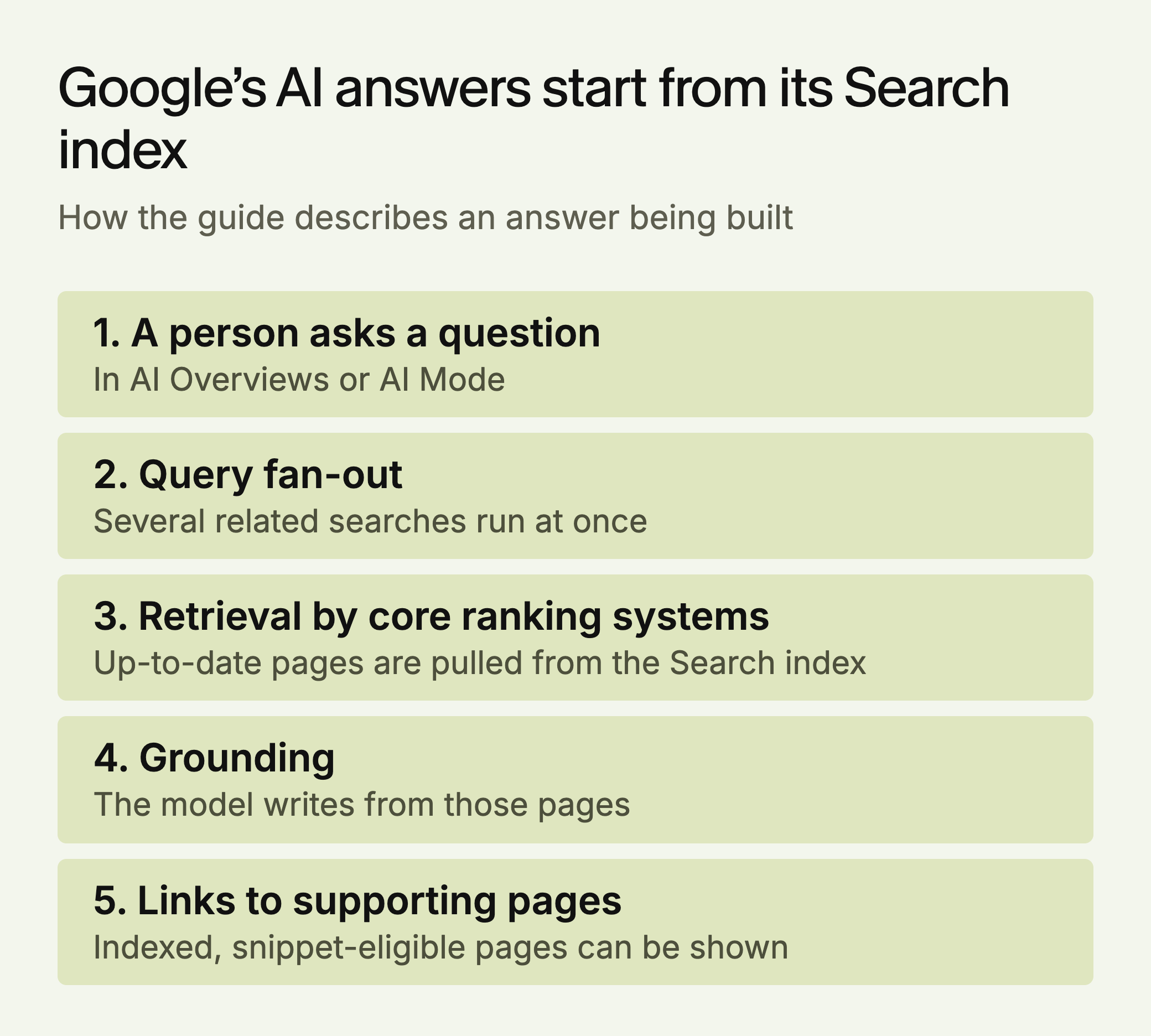
Google says its generative AI features are “rooted in our core Search ranking and quality systems.” When AI Overviews or AI Mode answer a question, they use those ranking systems to retrieve pages from the Search index.
To be a supporting link, a page must be indexed and eligible to show with a snippet. Google says there are no additional technical requirements and that meeting these criteria doesn’t guarantee a page will be shown. One eligibility point is easy to miss: the guide says the site must be included in generative AI features in Search Console, so confirm you haven’t opted out.
The guide doesn’t say a page must rank in any particular position. We read that to mean work that has no effect on Search is unlikely to help in AI Overviews or AI Mode.
Google also says “AEO” and “GEO” describe optimizing for the search experience, which it treats as SEO. That’s Google’s position on its own product, and it can only speak for Search.
The 5 Things Google Says You Don’t Need
They appear in a section of the guide called “Mythbusting generative AI search.”
1. llms.txt and similar files. Google Search doesn’t use them, so you don’t need them to appear in Search. Google says they’re fine to keep for other services and won’t help or harm your Search visibility. That matches SE Ranking’s study of nearly 300,000 domains, which found no measurable link to citations. Don’t expect citations from the file, though it may still give agents a useful map. Our llms.txt breakdown has more.
2. Chunking content. You don’t need to break pages into small pieces. Google says its systems can understand several topics on one page and that there’s no ideal length.
That’s narrower than it sounds. The same guide recommends clear paragraphs, sections and headings, and GEO-SFE, a March 2026 preprint found that restructuring 200 benchmark articles raised the citation rate across six engines from 45.0% to 52.8%. Google is warning against slicing pages into fragments, not against organizing them.
3. Rewriting for AI. You don’t need special phrasing or long-tail keyword variations, because the systems understand synonyms and general meaning.
The guide adds a warning that matters more. Creating pages for every query variation or fan-out query to manipulate rankings can violate the scaled content abuse policy.
4. Seeking inauthentic mentions. Google says these don’t help much, and that its ranking and spam systems both shape what AI features show.
This is about manufactured mentions, not real ones. Ahrefs’ study of 75,000 brands (vendor data) found branded web mentions correlated with AI Overview visibility at 0.664, against 0.218 for backlinks. That’s a correlation, but a reason to earn coverage.
5. Overfocusing on structured data. It isn’t required, and there’s no special schema.org markup for AI features. Google still recommends it for rich-result eligibility, and its structured data guidelines say not to mark up content readers can’t see. Outside Google, evidence on schema is mixed, as our review of the schema studies explains.
Ahrefs’ May 2026 test (vendor data) is the closest thing to a controlled result. It tracked 1,885 pages that added JSON-LD against 4,000 control pages, comparing citations in the 30 days before and after.
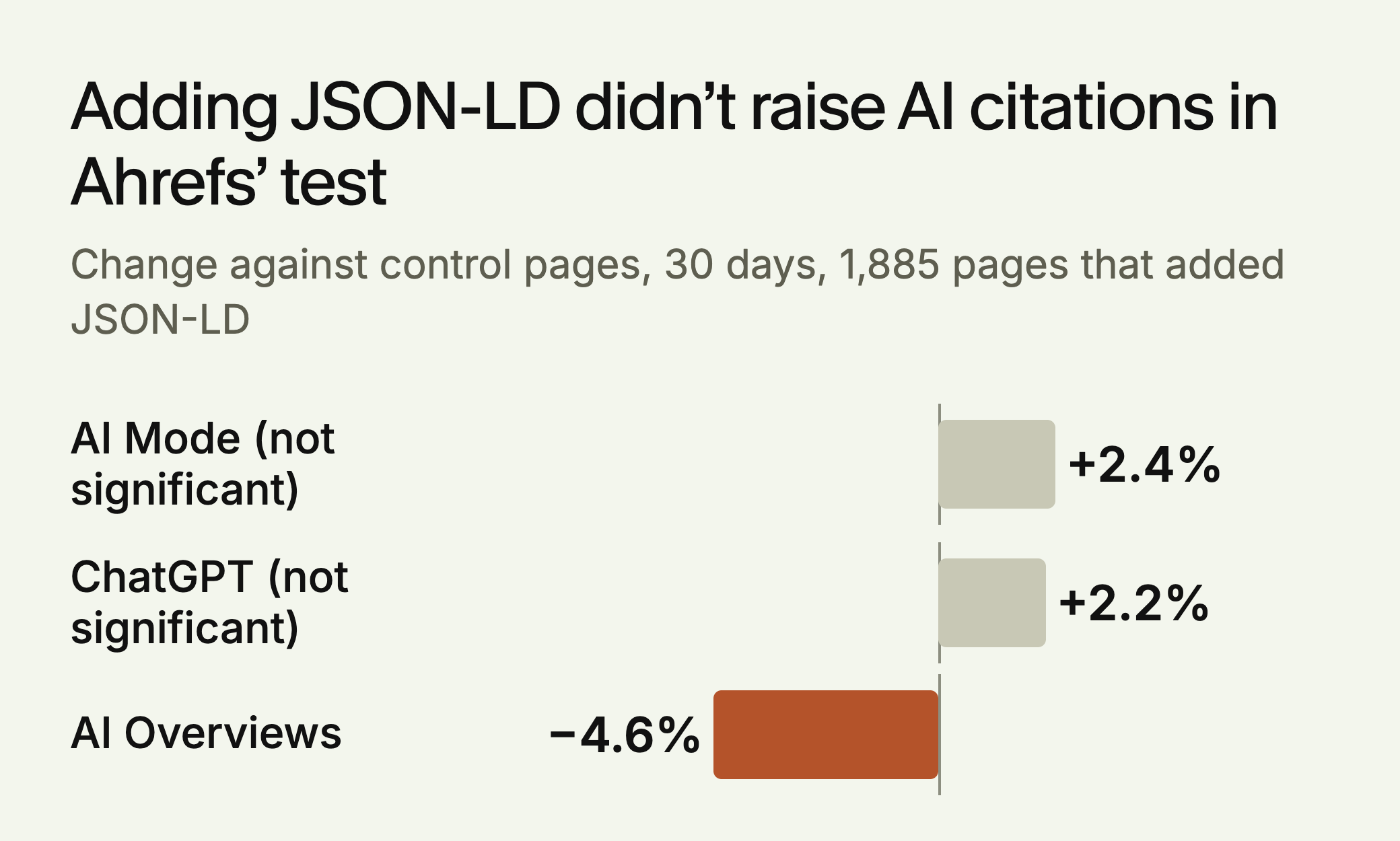
In AI Overviews, both groups were already falling, so Ahrefs can’t say schema caused that gap. It also tested only pages AI already cited. It does fit Google’s advice: add structured data for rich results, not for citations.
Here’s how we’d read the list in practice.
| Tactic | What it doesn’t cover | Do this |
|---|---|---|
| llms.txt | Other services and agents | Keep one if you have it. No project needed |
| Chunking | Clear sections | Organize by topic, without fragmenting |
| AI rewriting | Writing clearly for people | Skip keyword variants |
| Inauthentic mentions | Mentions you earn | Spend on coverage and original data |
| Structured data | Rich results, product data | Keep what describes real facts |
How Google’s AI Finds Content
Retrieval-augmented generation. Also called grounding, this means Google retrieves up-to-date pages from its index, reviews them to write a response, and links to supporting pages. If a page isn’t in the index, it can’t be used.
Query fan-out. The model runs several related searches at once to find more results for one question. Your page can be used for a search the user never typed, so cover the follow-up questions around your main topics.
Google adds in its AI features documentation that AI Overviews and AI Mode may use different models and techniques, so their answers and links can differ. It also says AI Overviews appear only when its systems judge that they add value beyond classic Search, so many queries won’t trigger one. Check both features before concluding a page isn’t being used.
What Google Recommends Instead
Content that isn’t a commodity. Google contrasts a generic tips list built on common knowledge with a first-hand account of a specific decision. Ask whether your page contains something a reader could only get from you: your own data, tests or experience.
The difference looks like this. The company and figures below are made up for illustration.
| Commodity | Non-commodity |
|---|---|
| Choosing a CRM is an important decision. Consider your budget, your team size and which integrations you need before you buy. | We moved 14 sales reps from Hubbery to Pipework in March. Import took 9 days, not the 2 we were quoted, because custom fields don’t map across. |
Technical basics. Pages must be crawlable, indexed and snippet-eligible. Google can process JavaScript as long as it isn’t blocked, but says these sites are more complex to optimize and points to its JavaScript SEO guidance. It also recommends pages that work on all devices, load quickly and make the main content easy to identify.
Semantic HTML, without obsessing. Google says it can read imperfect code, so perfect markup isn’t required. It still recommends semantic HTML because screen readers and other tools parse it more easily.
Less duplicate content. Duplicates can be a poor experience and waste crawling resources. Google suggests reducing them when you have time, which makes this a lower priority than indexing problems.
Feeds and profiles. Merchant Center feeds can help products appear in AI responses, and Business Profiles can do the same for local businesses.
Controls That Decide Whether You Can Appear
Check these settings before changing content. Any of them can keep a page out without anyone intending it.
| Control | What it does | Watch for |
|---|---|---|
| robots.txt for Googlebot | Controls crawling for Search | A rule meant for staging left on production |
| noindex | Removes the page from Search, so it can’t be a supporting link | Templates that add it to a whole section |
| nosnippet, max-snippet | Limit what’s shown from a page | A site-wide snippet limit added for another reason |
| data-nosnippet | Excludes a marked part of the page | Marked sections that hold your main answer |
| Google-Extended | Limits AI training and grounding in some of Google’s other systems | It’s listed separately from the Search controls above |
Confirm each control with the URL Inspection tool to see what Googlebot sees. Google says a recrawl can take several days to several months, so request one after a fix.
What Google Says About Agents
The guide has a section on agentic experiences. AI agents, including browser agents, may visit a site to book something or compare products. Google points to web.dev’s guidance on agent-friendly sites and names the Universal Commerce Protocol as an emerging standard. It also mentions Business Agent, a conversational Search experience that lets customers chat with a brand, and suggests considering it depending on your business.
Nothing here is required today. If you run a store or a booking flow, test whether a browser agent can get through it.
The guide says agents may work from screenshots, the DOM and the accessibility tree. Our reading is that unlabeled icons give them less to work with, and a rough check of our own is to complete the flow by keyboard alone.
How to Measure It
Google tells you to use the Generative AI performance report in Search Console, and to be skeptical of third-party tools claiming access to internal Google metrics. Its help page says the report rolled out to all websites by August 31, 2026. Know its limits before reading it:
- It counts impressions only. The help page doesn’t describe click data, so pair it with your analytics.
- It combines AI Overviews and AI Mode. The help page describes no way to separate them.
- Chart totals roll up by property. Two results from one site in the same AI feature count as one impression, so chart and table totals can differ.
- Tables stop at 1,000 rows, as elsewhere in Search Console, and the report may not appear on sites with too few AI impressions.
What to Do This Week
- Check indexing in Search Console. Fix important pages reported as not indexed before anything else.
- Audit robots.txt and snippet settings. Look for Googlebot blocks and
nosnippetrules on pages you want used. - Open the Generative AI report. Search Console’s Generative AI performance report shows AI Overview and AI Mode impressions by page, country and device. Note which pages appear and which important ones don’t.
- Add something original to your top five pages. Use a test you ran, your own numbers or a decision you made.
- Merge near-duplicates. Do this after the steps above.
- If you sell products or serve a local area, audit your Merchant Center feed and Business Profile.
Other engines work differently, so this list won’t cover them. To see where you appear across engines, run the free LLMagnet audit. LLMagnet measures AI visibility across seven engines and has an agent that prepares fixes for your approval.


 Gemini

 Ask Claude




 30-day free trial · no credit card