

 Ask Perplexity

AI agents mostly browse and compare today: checkout and payment routes took just 2.4% of agent traffic in May 2026, while product and search routes took 76.4%, in HUMAN Security data reported by PPC Land. To be ready when more of them buy, make your checkout controls readable by software, let verified agents past bot detection, and watch the payment protocols that prove a shopper’s approval.
Read that figure with care. It’s a share of agent traffic by route, not a completion rate, so it doesn’t mean 97% of agents abandoned a purchase. HUMAN sells cyberfraud defense, and this is vendor data from traffic seen across its own platforms.
Demand from people using AI to shop is growing. TIKR’s summary of Shopify’s Q2 2026 results says AI-driven traffic and orders to Shopify stores both tripled year over year. That’s a multiple with no volume attached, and it doesn’t separate autonomous agents from people clicking through from a chatbot.
Contents
- What the Route Data Shows
- Who the Agents Are
- Where Agents Get Stuck
- The Protocols, Compared
- What Applies to Your Store
- The Readiness Checklist
- A Worked Example: Reading Your Own Funnel
- What We Don’t Know About Agent Conversion
- Where to Start This Week
What the Route Data Shows
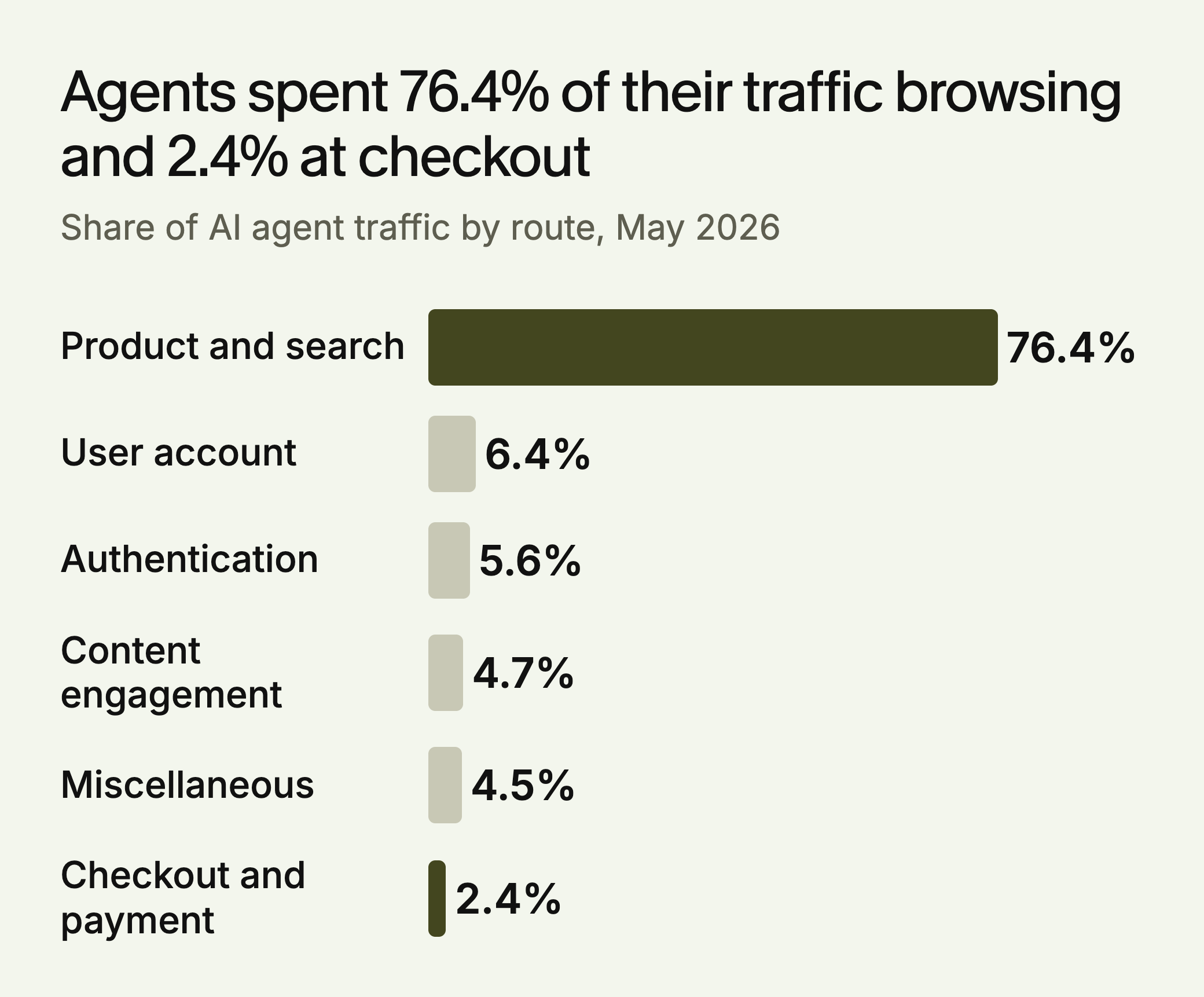
A small checkout share doesn’t tell you agents are failing. Shopping is mostly looking: a person might view dozens of product pages for each trip through checkout, and the report gives no human benchmark to compare with. It also doesn’t say how HUMAN identifies agent traffic or calculates shares.
The more useful clue is the middle of the chart. Account and login routes together took 12.0% of agent traffic, five times the share of checkout. Route data can’t say why. One possible reading is that agents often reach a step that needs a person’s credentials and stop there. That’s a hypothesis, but it’s a cheap one to check: see whether your store allows guest checkout, and whether the path to it is obvious from the login page.
Who the Agents Are
The May HUMAN figures put Perplexity’s Comet at 47% of agent traffic, OpenAI’s Atlas at 20.3% and Anthropic’s Claude Chrome extension at 18.6%. This mix changes quickly. OpenAI later folded Atlas into ChatGPT Work, with August 9 set as the date Atlas would stop working, so don’t build rules around one product’s name.
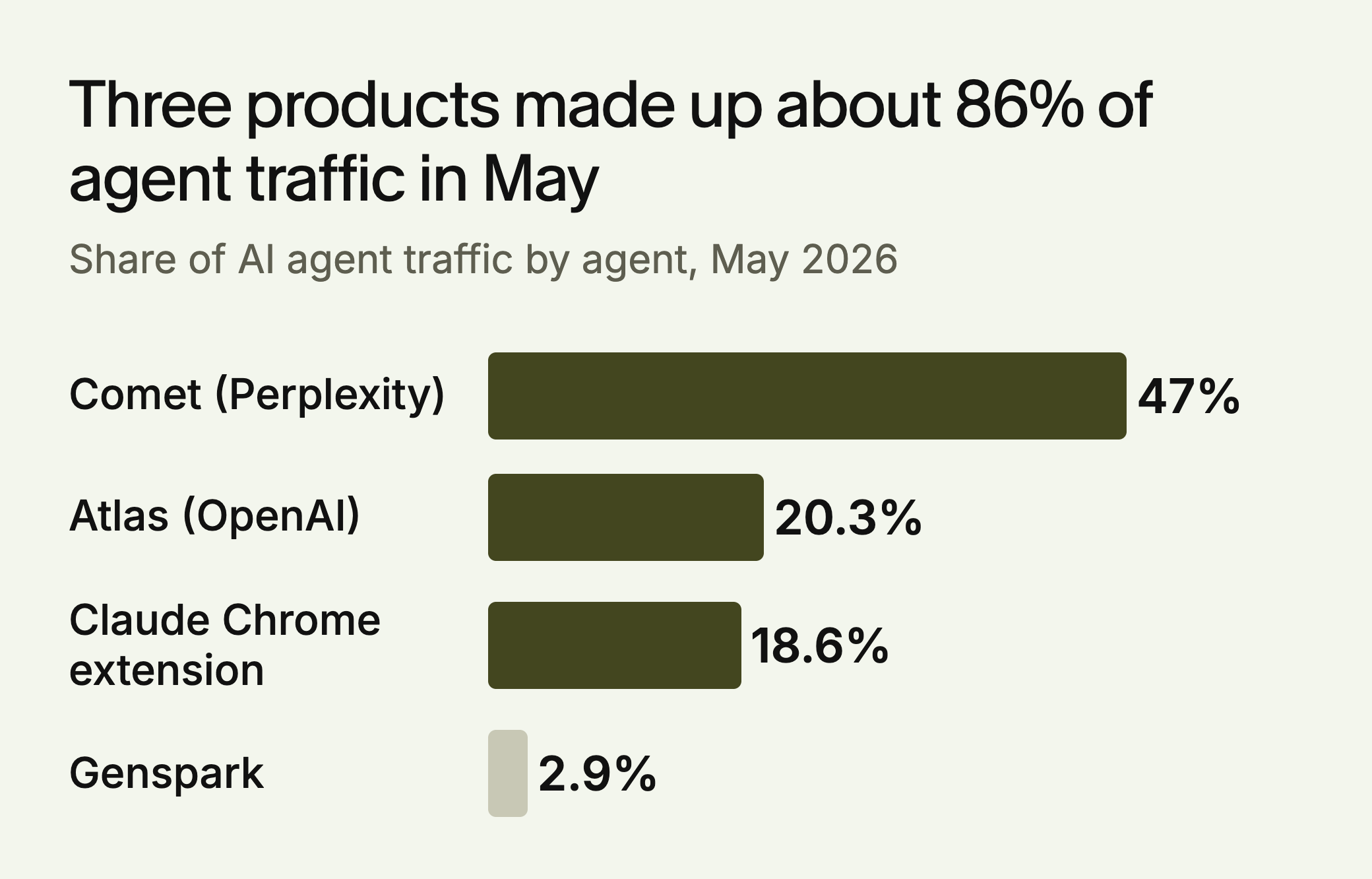
The top of this list can turn over within months. In a September 2026 post reported by PPC Land, HUMAN said Meta’s Muse averaged 72% of daily AI agent requests on its platform, with ChatGPT Agent next. HUMAN counted requests in that post and traffic share in May, so the two can’t be compared directly. It said Muse was 25% more likely than other agents to reach checkout pages, without giving an absolute rate.
E-commerce took 40.5% of agent traffic in May, behind media at 43.4% and ahead of travel at 13.7%. So stores are already being visited, though this data doesn’t show how many agents go on to pay.
Where Agents Get Stuck
No published study we found breaks down why agents stop short of checkout. These three problems follow from how the agents work, and you can check each one.
1. Custom Checkout Controls
Agents need to identify a field and know what it does. OpenAI’s publisher guidance, as reported by Kickpoint, said Atlas used ARIA tags, the labels and roles that screen readers rely on, to interpret page structure. A shipping selector built from unlabeled <div> elements gives an agent very little to work with. The same goes for custom date pickers, quantity spinners and address widgets.
The fix: Use native <input>, <select> and <button> elements where you can. Where you can’t, add correct roles, labels and states. This also helps people who use screen readers. Keep any state current: an aria-expanded value that never changes tells software a menu is closed when it’s open. The W3C’s ARIA guidance warns that incorrect ARIA misrepresents the page, so a wrong label can be worse than none.
2. Proving the Shopper Approved the Purchase
A merchant needs to know that a person really authorized a purchase. The Agent Payments Protocol (AP2) is one attempt to solve this. It uses signed credentials called mandates: a Checkout Mandate records the items and details agreed, and a Payment Mandate authorizes payment on a specific instrument. Standardization is continuing at the FIDO Alliance, so treat it as something to follow and not something to build this month. AP2 mandates come in two stages. An open mandate records the shopper’s limits, such as a budget, before a cart exists. A closed mandate approves one finalized checkout and amount.
The fix: Ask your payment provider which agent payment protocols it supports or plans to support. Until then, expect agents to hand the final confirmation back to the shopper, and make sure that step is simple.
3. Bot Detection Blocking Legitimate Agents
Security tools can’t always tell a shopping agent from a scraper. HUMAN said the share of agent traffic stopped or filtered rose from 8.2% in April to nearly 9% in May.
Don’t allowlist on a user agent string, which anyone can fake. Web Bot Auth uses cryptographic HTTP signatures that merchants and networks can validate against published keys. Visa’s Trusted Agent Protocol and Mastercard’s Agent Pay both build on it, and add a tag showing whether an agent is browsing or purchasing. In practice the agent sends Signature-Input and Signature headers, with the tag agent-browser-auth or agent-payer-auth. The checks confirm the key, the time window and a single-use nonce, so a captured request can’t simply be replayed.
The fix: Ask your WAF or CDN provider whether it can verify signed agents, then set separate rules for browsing and purchase traffic.
The Protocols, Compared
Four efforts get mixed together in this area, and they solve different problems. Most merchants won’t implement any of them directly. Your job is to know which ones your platform and payment provider support.
| Protocol | Problem it solves | Who’s behind it | What to do now |
|---|---|---|---|
| ACP | Lets agents start a checkout with a merchant | Stripe and OpenAI | Ask your payment provider |
| UCP | Shared building blocks for catalog, cart, checkout, account linking and orders | Partners listed include Google, Shopify, Amazon, Microsoft and Stripe | Ask your commerce platform about support |
| AP2 | Signed proof of what the shopper approved | Standardization continuing at FIDO | Follow it, and ask your payment provider |
| Web Bot Auth, with Visa and Mastercard programs | Proves which agent is calling and whether it’s browsing or buying | Visa, Mastercard, with Cloudflare validating | Ask your WAF or CDN provider |
Plans in this area change quickly. Digital Commerce 360 reported in March 2026 that OpenAI was moving Instant Checkout into merchants’ ChatGPT apps, while keeping ACP as the infrastructure linking users to merchants. The work that survives these changes is on your own pages.
What Applies to Your Store
- Hosted checkout you can’t edit: You can’t change the markup, so put your effort into product page data and bot rules, and ask your platform which agent protocols it supports.
- Custom or headless checkout: Do the control audit first. You own every unlabeled widget, and no platform update will fix them for you.
- B2B or quote-based sales: We’d expect agents to research more than buy here. Make specs, minimum orders and lead times readable, and label your quote form properly.
The Readiness Checklist
Checkout Controls
- Every checkout field is a native element, or has a correct role, label and state
- Variant, quantity and shipping choices are visible in Chrome’s accessibility tree
- Errors appear as text next to the field, not only as color or an image
- Challenge pages don’t appear in the middle of checkout for verified traffic
Product Data
- Price, stock, variants and shipping cost appear as text on the product page
- Those details match your feeds and any API you publish
- Return and delivery terms are in plain text and easy to reach
Payments and Authorization
- You know which agent payment protocols your provider supports
- The final confirmation step is short and works for a person taking over from an agent
- Orders placed through agents can be identified in your logs
Agent Access
- Your WAF logs show how much agent traffic it challenges, and on which routes
- Signed agents can be verified, with separate rules for browsing and purchasing
- If you sell at volume, an MCP server for catalog and stock is on your roadmap
A Worked Example: Reading Your Own Funnel
The store and figures below are made up for illustration. Marlowe Tea tagged agent sessions in its logs for one week.
| Step | Agent sessions | Challenged by the WAF |
|---|---|---|
| Product page | 3,200 | 2% |
| Cart | 410 | 3% |
| Checkout | 60 | 38% |
| Order confirmed | 12 | None |
The large fall from product page to cart may be normal, since many agents are only comparing. The figure that stands out is 38% challenged at checkout, because a legitimate buyer’s agent can’t get past a challenge it can’t solve. Marlowe would fix that first by asking its CDN provider about signed agents, then compare the same week’s numbers a month later. Treat the count as rough: user agents and IP addresses can be spoofed, so a log tag is only an estimate until agents sign their requests.
What We Don’t Know About Agent Conversion
You may see a claim that agents convert at 15.9%. That figure doesn’t measure agents. It comes from a Seer Interactive case study of one client between October 2024 and April 2025, where people arriving from ChatGPT converted at 15.9%, against 1.76% for Google organic. AI sources sent just under 11,000 sessions, and Seer itself notes that it’s one client’s data.
We found no reliable public figure for how often AI agents complete a purchase. Measure your own: separate agent traffic in your logs, and count how much of it reaches cart, checkout and confirmation.
Where to Start This Week
Open your checkout in Chrome DevTools and inspect the accessibility tree for every step. Fix any control that has no name or role. Then pull a week of WAF logs and see how much agent traffic is being challenged on product and checkout routes. Those two checks tell you more about your own store than any industry average.
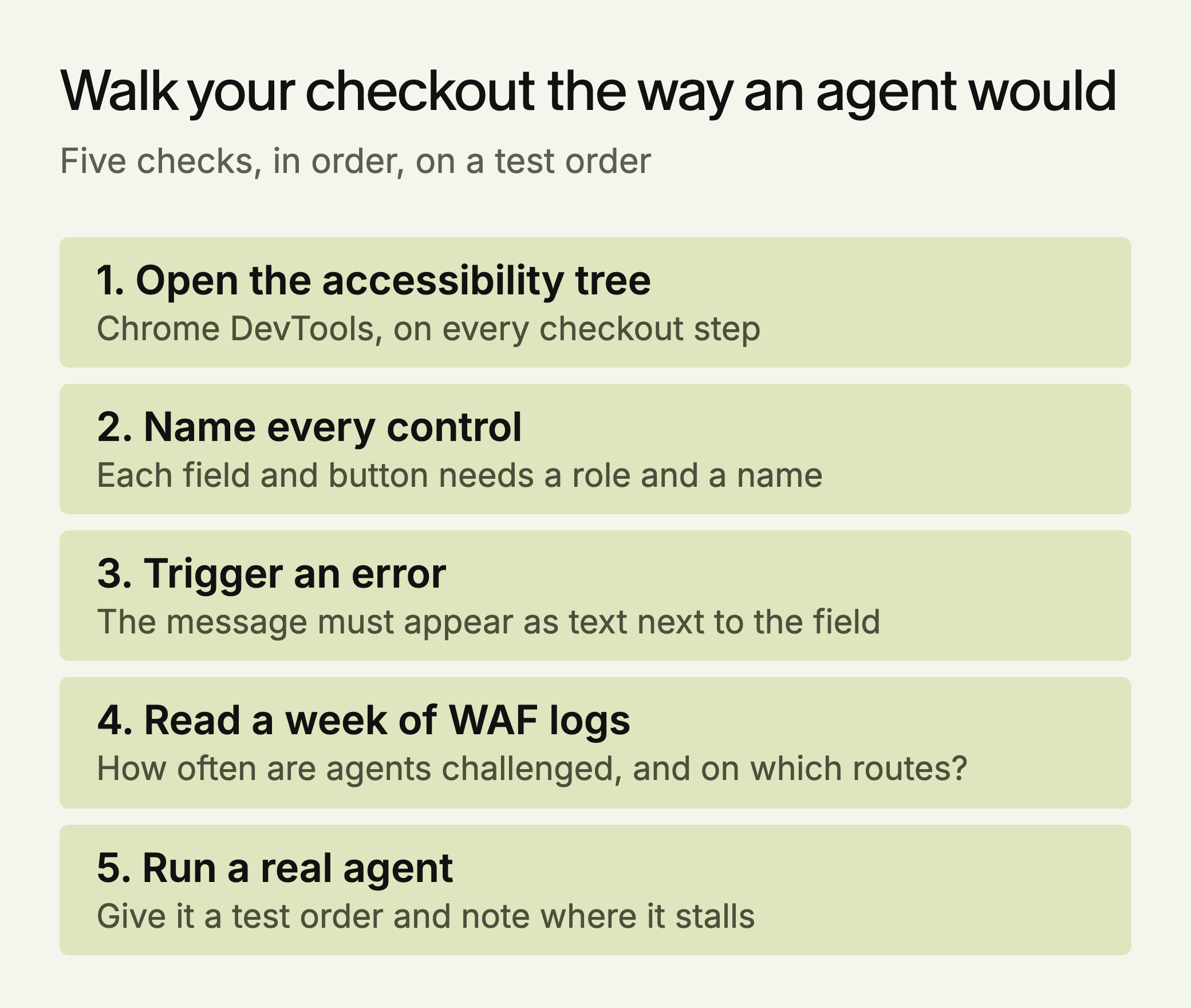
To open the tree, go to the Elements panel in Chrome DevTools, select the Accessibility tab and turn on Show accessibility tree. You’ll know the audit worked when every control on the path has a name you could read aloud and the test agent reaches the confirmation step.



 Ask Gemini

 Ask Claude


 30-day free trial · no credit card