


Search Console now shows how often links to your site appeared in Google’s generative AI features, but only as impressions. There are no clicks or queries, so the report tells you where you appeared and not what that earned you. Google announced it on June 3, 2026, starting with a subset of UK sites, and rolled it out worldwide by August 31.
This is still useful. Until now, most sites had no first-party data on these features. Bing’s AI Performance report adds a second view through its Citation Share metric, covering Microsoft’s surfaces. Neither report names ChatGPT or Perplexity as a source, so together they’re a partial picture.
Contents
- What Google’s Reports Contain
- What Bing’s Citation Share Measures
- Check for Manual Actions Before You Rewrite
- How to Use Impression Data to Prioritize Updates
- A Worked Example: Reading Three Pages
- Finding Gaps Between Platforms
- A Weekly Routine
- What the Reports Still Don’t Tell You
- FAQ
What Google’s Reports Contain
Google’s help page describes one metric: impressions, meaning how many times links to your site were shown to a user in a generative AI feature. In the chart, several results from the same site within one AI result count as one impression. You can view the data by page, country, date or device, and filter by web search type.
A few details change how you read the numbers. Most data is assigned to the canonical URL after redirects, so a retired URL folds into its replacement. Dates run on Pacific Time, and the newest days are preliminary and shown as a dotted line, so don’t read them as a fall. Chart and page-table totals can differ, because the chart counts several results from one site as one impression. The report covers AI Overviews and AI Mode together, excludes Search Labs experiments, and lists no dimension that separates the two.
There’s a separate report for generative AI in Discover, which shows impressions by page, country and time, as reported by TechWyse. Search Engine Roundtable reports that the reports exclude both clicks and queries, and Google says only that it will “introduce additional metrics over time.” If you don’t see the report, your site may not have enough impressions yet.
Don’t read an impression as a visit. Seer Interactive’s study found organic CTR on queries with AI Overviews fell from 1.76% to 0.61% between June 2024 and September 2025, and that’s from 42 client organizations on informational queries. A high impression count may bring few clicks.
Google also added a control that lets you remove your site from these features. Google says it won’t be used as a ranking signal for results outside them, but opting out means giving up that traffic and those impressions.
What Bing’s Citation Share Measures
Bing’s Citation Share, in preview since June 16, 2026, is the percentage of citations attributed to your site out of all citations shown for a given grounding query. A share of 12% on a query means 12% of the citations for that query were yours.
The report covers Microsoft Copilot, Bing and select partner AI experiences. Bing is clear about the limits: it doesn’t show competitor domains, and it doesn’t represent traffic share or content quality.
The preview adds three other views. Intents labels your grounding queries by type, such as Informational, Commercial or Local. Topics groups related queries into themes. Compare overlays an earlier period. Bing warns that labels may be broad in niche domains, and that many factors can move citations, so Compare shows change without explaining it. Read share alongside the raw citation count: going from 2 of 20 citations to 2 of 10 doubles your share with no new citations.
Don’t read it as a ChatGPT report, though, since Bing doesn’t name its partners. A widely quoted figure says 87% of ChatGPT citations match Bing’s results, but that comes from a Seer Interactive sample of about 500 citations and 100 questions, published in February 2025, which its authors called limited. Most of its questions contained “best” or “top”, and the data is nearly two years old, so don’t use Citation Share as a stand-in for ChatGPT visibility.
| Google Search Console | Bing Webmaster Tools | |
|---|---|---|
| Main metric | Impressions | Citations and Citation Share |
| Surfaces | AI Overviews and AI Mode, with Discover separate | Copilot, Bing and select partner AI experiences |
| Queries shown | No | Grounding queries |
| Best for | Which pages appear in Google’s AI features | Which questions and topics cite you |
| Won’t tell you | Clicks, or which query triggered it | Competitor names, traffic share or quality |
Check for Manual Actions Before You Rewrite
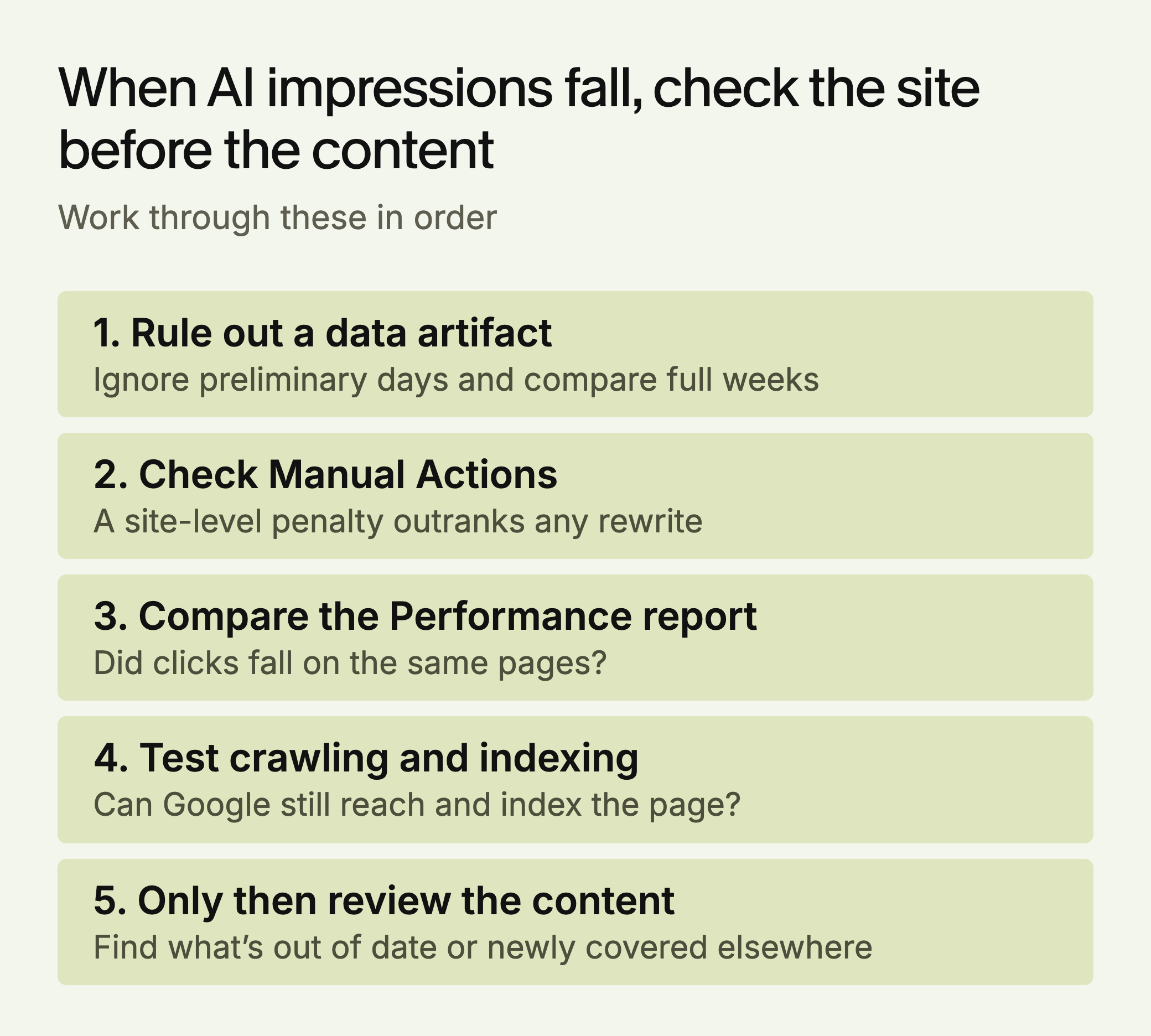
If your AI impressions collapse, rule out a site-level problem first. Glenn Gabe’s April 2026 case study followed one site whose AI-generated /us/ section appears to have received a manual action for scaled content abuse. After it left Google’s index, the section’s citations dropped in AI Overviews and AI Mode, and it stopped being cited for nearly all the ChatGPT prompts he tested. That’s one site, and Gabe inferred the manual action from the timing.
Lily Ray’s February 2026 analysis points the same way from a different angle. Across 11 subfolders hit by an unconfirmed Google update, organic traffic fell 26.7% on average and AI citations fell 22.5%, with ChatGPT down 27.8%. It’s a small sample using third-party estimates, and manual actions weren’t part of it.
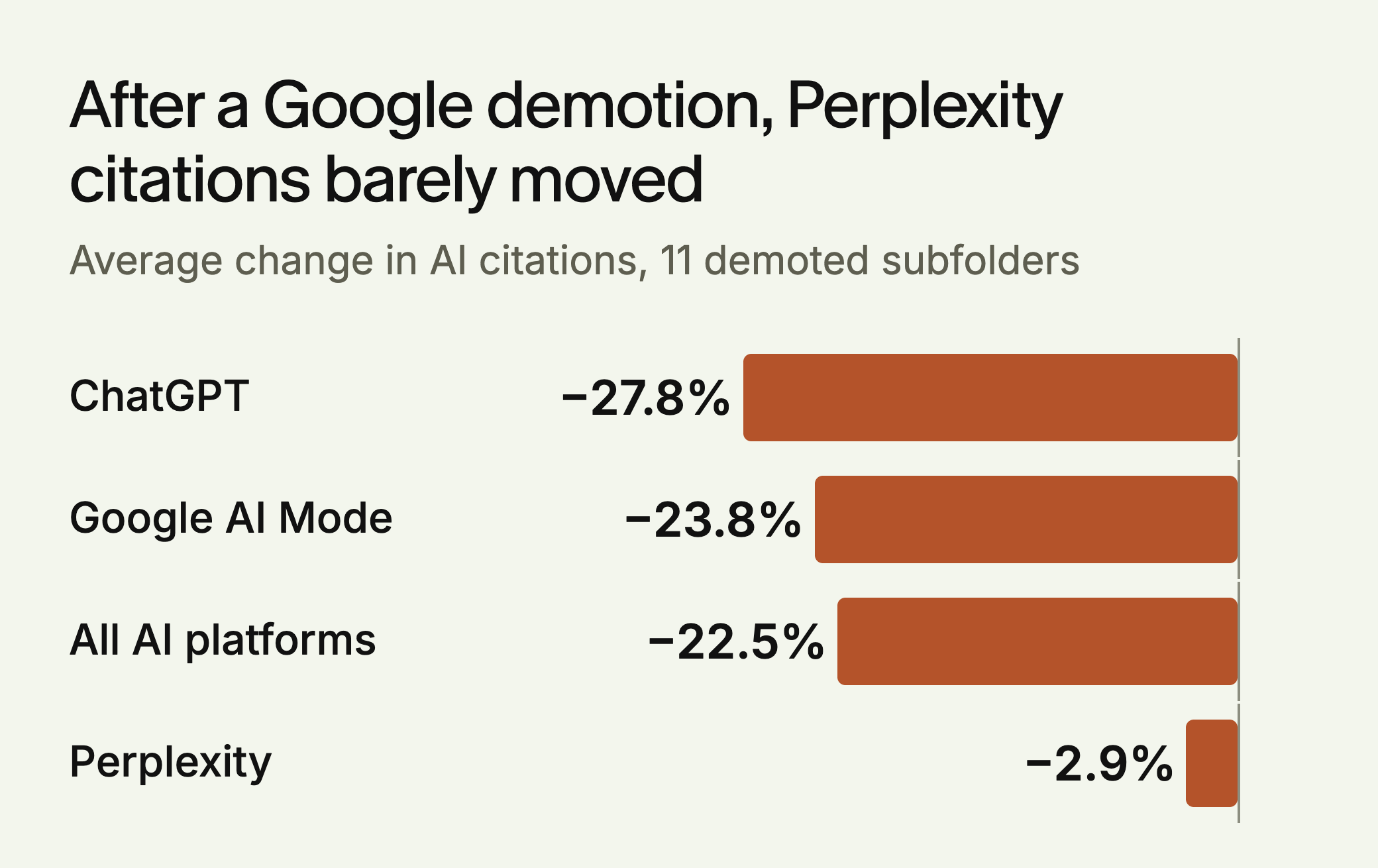
The split is useful for diagnosis. Perplexity barely moved, and citations grew there for 7 of the 11 sites. Ray’s explanation is that engines drawing on Google inherit its losses, and she notes that ChatGPT’s use of Google isn’t officially confirmed, so treat that as a hypothesis. Our reading: if AI impressions and ChatGPT citations fall together while Perplexity holds, look at Google first.
The practical step is simple. If AI impressions drop sharply, open the Manual Actions report and your regular Performance report before you touch the content. Organic health and AI visibility appear linked, though not identical: Ahrefs found that only 37.1% of URLs cited in AI Overviews also ranked in the top 10 blue links for the same query (37.9% when SERP features are counted).
How to Use Impression Data to Prioritize Updates
Sort pages by AI impressions, then compare with the same pages in your regular Performance report. Since the AI report has no queries, use the regular report to see which queries each page already earns.
Small sites may not see the report at all, and Google publishes no impression threshold. Sites with more than 1,000 pages should export by section with a URL filter, because the table stops at 1,000 rows.
- Rising AI impressions, falling clicks: check whether the page gives people a reason to visit, such as data, tools or depth an answer can’t carry.
- Falling AI impressions: review what has gone out of date, and what newer pages now cover.
- Strong search traffic, no AI impressions: check whether the page answers the question directly.
Two content changes are worth testing. First, add sourced numbers. SE Ranking’s vendor study found pages with 19 or more statistics averaged 5.4 ChatGPT citations against 2.8 for pages with few, though it calls this factor relatively minor and the result is a correlation. Second, put the direct answer near the top of the page. That’s our judgment, and it costs little to try.
A Worked Example: Reading Three Pages
The site and figures below are made up for illustration. Tolvane Tools compared four weeks of AI impressions with the regular Performance report.
| Page | AI impressions | Search clicks | Reading | Next step |
|---|---|---|---|---|
| Pricing guide | Up 40% | Down 12% | The answer may be doing the work | Add a calculator or data a summary can’t carry |
| Vendor checklist | Down 55% | Flat | Search is healthy, AI visibility isn’t | Check what’s now cited for its queries |
| Comparison page | None | Up 8% | Ranks, but isn’t shown in AI features | Put the direct answer near the top |
Don’t divide clicks by AI impressions to get a click rate. The regular report’s clicks cover all web results, so the ratio doesn’t describe AI features.
Finding Gaps Between Platforms
Compare three sources for your priority pages: Google AI impressions, Bing citations and AI referral visits in your analytics (chatgpt.com, perplexity.ai, copilot.microsoft.com, claude.ai).
- Strong on Google, weak on Bing: check that the page is indexed in Bing and review its position in Bing Webmaster Tools.
- Strong on Bing and Google, no ChatGPT or Perplexity referrals: run your target questions in those products directly, since neither report names them. Remember that many people read an answer without clicking.
- Weak everywhere: look at crawl access and content quality first.
A Weekly Routine
Keep it short, and do the same four checks each week:
- Check Google AI impressions week over week. Flag pages with the largest drops.
- Check Citation Share in Bing for your main grounding queries, and use Compare to see what moved.
- Check AI referral traffic in your analytics for the same period.
- Pick one or two flagged pages to review and update. Note the date so you can see whether the change had any effect.
Weekly numbers are noisy, so act on trends that hold for several weeks. Keep your exports in one sheet, and note that cells marked with a tilde or a dash export as zeros, so a sudden zero may not be a real one.
What the Reports Still Don’t Tell You
You get no Google AI clicks, no Google AI queries, and nothing about how your brand is described. Neither report names ChatGPT, Perplexity or Claude. These reports are a good start, but they don’t close the measurement problem.
To fill in the engines those reports miss, try the free LLMagnet audit. LLMagnet measures AI visibility across seven engines, and its agent prepares fixes for you to approve.

 Ask Claude



 Ask Gemini


 30-day free trial · no credit card