# Most AI Crawlers Don’t Run JavaScript: What That Means for React
> OpenAI, Anthropic and Perplexity crawlers read raw HTML, so client-rendered pages can look empty. How to test what they see and fix it.
URL: https://llmagnet.com/blog/ai-crawlers-javascript
Author: Ben Cohen, Founder & CEO at LLMagnet
Published: 2026-06-24
Updated: 2026-11-10
Category: Guides
Most AI crawlers do not run JavaScript, so a page that builds its content in the browser can look empty to them. Vercel’s December 2024 analysis of its own network found no JavaScript rendering by the crawlers from OpenAI, Anthropic, Meta, ByteDance or Perplexity. The fix is to put your important content in the initial HTML, with server-side rendering or static generation.
The volume in that analysis was large: 569 million GPTBot fetches and 370 million from Claude’s crawler in one month on Vercel’s network. ChatGPT and Claude crawlers did download JavaScript files (11.50% and 23.84% of their requests), but Vercel found they don’t execute them.
AI crawling was still growing in 2025. [Cloudflare reports](https://blog.cloudflare.com/from-googlebot-to-gptbot-whos-crawling-your-site-in-2025/) that GPTBot requests rose 305% from May 2024 to May 2025, taking it from 2.2% to 7.7% of AI and search crawler traffic. From January to early December 2025, AI bots averaged 4.2% of HTML requests on Cloudflare’s network, just below Googlebot’s 4.5%, according to its [2025 Radar review](https://blog.cloudflare.com/radar-2025-year-in-review).
## Contents
1. What AI Crawlers Receive From Your Site
2. How to Test What AI Crawlers See on Your Site
3. Which Sites Are Most Affected
4. Where a Hybrid App Goes Wrong
5. The Fix: Server-Side Rendering and Static Generation
6. What to Prioritize First
7. Verify AI Crawlers Can Access Your Site
8. Fix Broken URLs While You’re There
9. What the Citation Data Shows
10. What to Do This Week
11. FAQ
## What AI Crawlers Receive From Your Site
A crawler that doesn’t run JavaScript keeps only what your server sends in the first HTML response. [Google’s documentation](https://developers.google.com/search/docs/crawling-indexing/javascript/javascript-seo-basics) says Googlebot renders pages with an evergreen version of Chromium, and also warns that “not all bots can run JavaScript.” Vercel’s findings show which ones:
| Crawler or fetcher | Runs JavaScript? |
| --- | --- |
| Googlebot | Yes (headless Chromium) |
| Gemini, through Googlebot’s infrastructure | Yes |
| AppleBot | Yes |
| GPTBot, OAI-SearchBot, ChatGPT-User (OpenAI) | No |
| ClaudeBot (Anthropic) | No |
| PerplexityBot | No |
| Meta-ExternalAgent | No |
| Bytespider (ByteDance) | No |
That table is Vercel’s data, nearly two years old, and crawlers can change. A newer test points the same way for fetchers triggered by a user’s question. In [RESONEO’s January 2026 test](https://think.resoneo.com/sentinel/geo-llm-crawler-report.html), ChatGPT-User, Claude-User and Gemini’s user-triggered fetch did not run JavaScript, while Bing Copilot, Grok and DeepSeek did. Perplexity-User’s result was unusable, since it missed even the static HTML. That is one vendor’s test on one page, and it did not cover the indexing crawlers, so check your own pages instead of relying on a list.
On a server-rendered or static site, the first response already holds the content. On a client-rendered React app, it often looks like this:
```
```
Your product descriptions, FAQs and pricing arrive later, through JavaScript. A crawler that stops at the first response gets none of them.
Google gets past this with a second stage: the page waits in a queue, then a headless browser runs its JavaScript. The crawlers marked “No” above have no second stage.
## How to Test What AI Crawlers See on Your Site
curl doesn’t run JavaScript, so it shows you the same first response. Send a GPTBot user agent and search the output for a sentence you can see on the page:
```
curl -s -A "GPTBot" https://yoursite.com/your-page/ | grep -i "a sentence from your page"
```
If grep prints the sentence, it’s in the raw HTML. If it prints nothing, a crawler that doesn’t render JavaScript can’t read that text.
There’s also a faster check. Open the page’s source in your browser (Ctrl+U on Windows, Cmd+Option+U in Chrome on a Mac) and search for the same sentence. Use view source, not the Inspect panel, because Inspect shows the page after JavaScript has run.
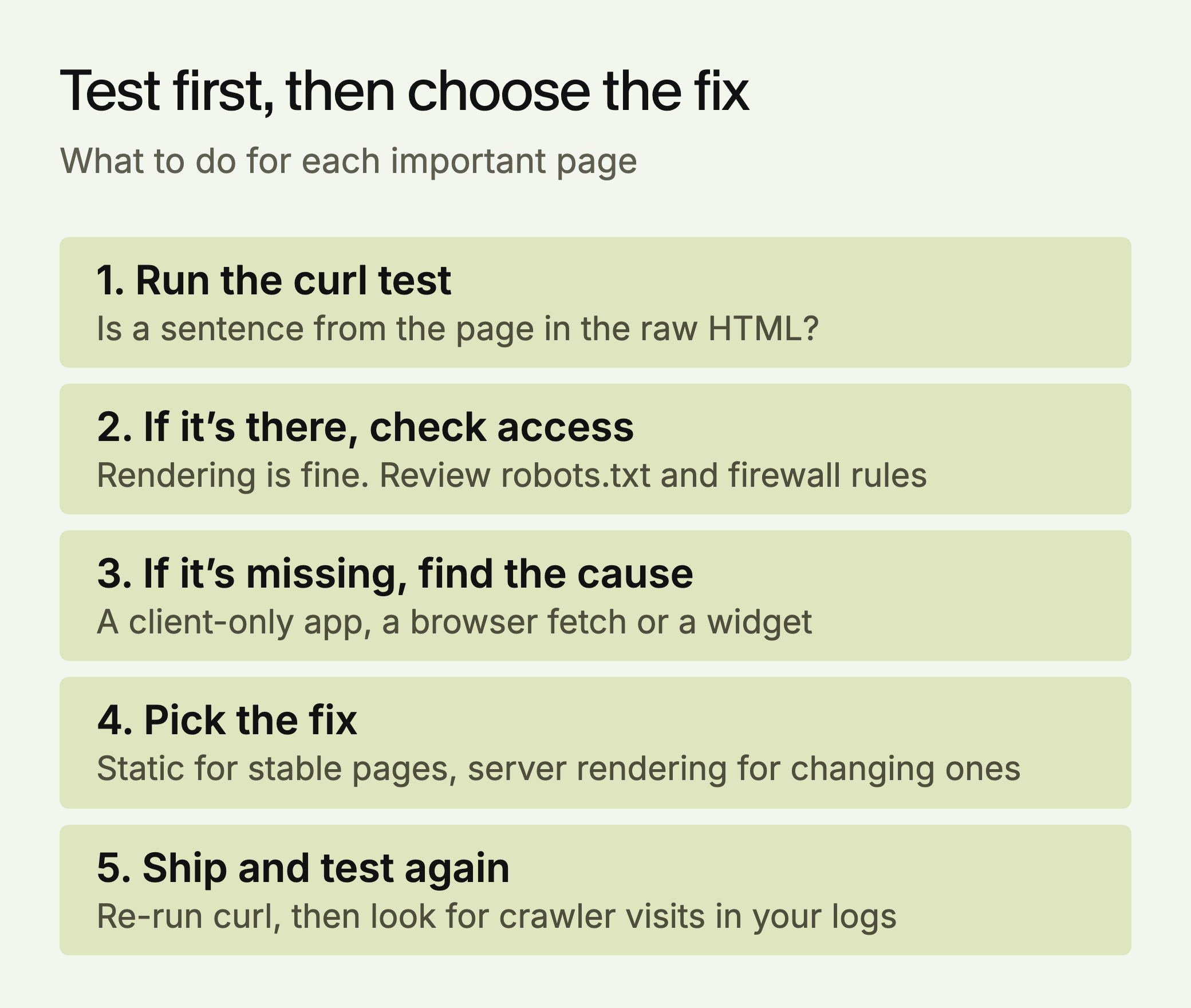
*The order is our own recommendation.*
## Which Sites Are Most Affected
**High risk: client-only apps.** Create React App, Vite with React and no server rendering, Vue without SSR, Angular without server rendering. If your marketing site or docs are built this way, assume these crawlers can’t read them until the curl test says otherwise.
**Medium risk: hybrid apps.** A framework that supports server rendering doesn’t guarantee you’re using it. A Next.js page can still fetch its main content in the browser. Test individual product and FAQ pages, not only the homepage.
**Lower risk: server-rendered and static sites.** WordPress, Webflow, Astro, Hugo, and Next.js pages that render on the server or at build time usually send full HTML. Plugins and embedded widgets can still load key content through JavaScript, so test those pages too.
## Where a Hybrid App Goes Wrong
[Next.js’s documentation](https://nextjs.org/docs/app/getting-started/server-and-client-components) says Client Components are prerendered to HTML on the server for the first load, then made interactive in the browser. So a file marked `'use client'` isn’t automatically invisible. What hides content is fetching it after the page loads. The page below is made up for illustration.
```
'use client'
export default function Pricing() {
const [plans, setPlans] = useState([])
useEffect(() => {
fetch('/api/plans').then(r => r.json()).then(setPlans)
}, [])
return
}
```
The server prerenders this with an empty list, because `useEffect` only runs in the browser. The crawler receives a table with no rows. Fetching in a Server Component, with `const plans = await getPlans()`, puts the rows in the first response.
Three other patterns fail the same way: tabs that fetch their content when opened, review or FAQ widgets loaded from a third party, and JSON-LD added by a tag manager. [Google says](https://developers.google.com/search/docs/appearance/structured-data/generate-structured-data-with-javascript) it can read structured data injected with JavaScript, but a crawler that doesn’t run JavaScript never sees it.
## The Fix: Server-Side Rendering and Static Generation
Vercel’s advice is to prioritize server-side rendering for critical content, and client-side rendering remains fine for extras such as view counters and chat widgets. You have three ways to get there:
**1. Static generation.** Build the HTML ahead of time, so every page is a complete file. Next.js, Astro, Gatsby and Hugo all support this. It suits content that doesn’t change often: product pages, feature descriptions, FAQs.
**2. Server-side rendering.** Render the page on each request and send complete HTML. Next.js, Nuxt and SvelteKit all support this. It costs more server work than static files, and it’s the right choice for content that changes often and still needs to be readable by crawlers.
**3. A prerendering service.** [Prerender.io](https://docs.prerender.io/docs/recommended-ai-crawler-user-agents-for-prerender) and similar tools match a crawler’s user agent and serve it a rendered snapshot. It’s the smallest code change, with two risks: a crawler missing from your list still gets the empty page, and snapshots go stale.
Which to pick is our judgment, by page type:
| Situation | Use | Why |
| --- | --- | --- |
| Marketing site, docs or blog that changes weekly or less | Static generation | Cheapest to serve |
| Thousands of product pages with changing prices or stock | Server rendering, or static pages rebuilt in the background | Rebuilding everything for each price change doesn’t scale |
| Old single-page app with no rewrite planned this quarter | Prerendering, as a bridge | Keep the crawler list and refresh schedule up to date |
## What to Prioritize First
Not every page needs this work. Start with the pages that answer the questions your buyers ask AI tools:
1. **Product and feature pages**: what you do, in clear sentences
2. **FAQ pages**: direct answers to specific questions
3. **Comparison pages**: how you differ from the alternatives
4. **Use case and customer pages**: named situations and real outcomes
5. **Pricing pages**: if your prices are public
Checkout flows, dashboards and account settings can stay client-rendered. They’re not content an AI answer would draw on.
## Verify AI Crawlers Can Access Your Site
Rendering only helps if crawlers can reach the page. After you ship, check three things.
**robots.txt allows the crawlers you want.** The names matter. [OpenAI’s documentation](https://developers.openai.com/api/docs/bots) says sites that opt out of OAI-SearchBot won’t appear in ChatGPT search answers, while GPTBot covers model training. You can allow one and block the other. To allow the main ones:
```
User-agent: GPTBot
Disallow:
User-agent: OAI-SearchBot
Disallow:
User-agent: ClaudeBot
Disallow:
User-agent: Claude-SearchBot
Disallow:
User-agent: PerplexityBot
Disallow:
```
An empty Disallow means nothing is blocked. Also check your CDN and firewall, because robots.txt isn’t the only gate. Vercel, for example, offers a firewall rule that blocks AI bots.
Fetchers triggered by a user’s question follow different rules. OpenAI says robots.txt may not apply to ChatGPT-User, and [Perplexity says](https://docs.perplexity.ai/guides/bots) Perplexity-User generally ignores it. [Anthropic](https://support.claude.com/en/articles/8896518-does-anthropic-crawl-data-from-the-web-and-how-can-site-owners-block-the-crawler) documents three bots: ClaudeBot for training, Claude-SearchBot for search and Claude-User for questions, and says blocking the last two may reduce your visibility. OpenAI says robots.txt changes take about 24 hours to reach its search.
**Server logs show the visits.** Search your access logs for these user agents to confirm they’re reaching the pages you changed. A user agent can be faked, so check IP addresses against the ranges those companies publish.
**The curl test now passes.** Re-run it on each key page after deployment. It has one blind spot: it sends a crawler’s name from your own address, so a firewall rule based on verified bot IPs will treat you differently from the real crawler.
## Fix Broken URLs While You’re There
Vercel also reported that ChatGPT spent 34.82% of its fetches on 404 pages and another 14.36% on redirects, against 8.22% and 1.49% for Googlebot.
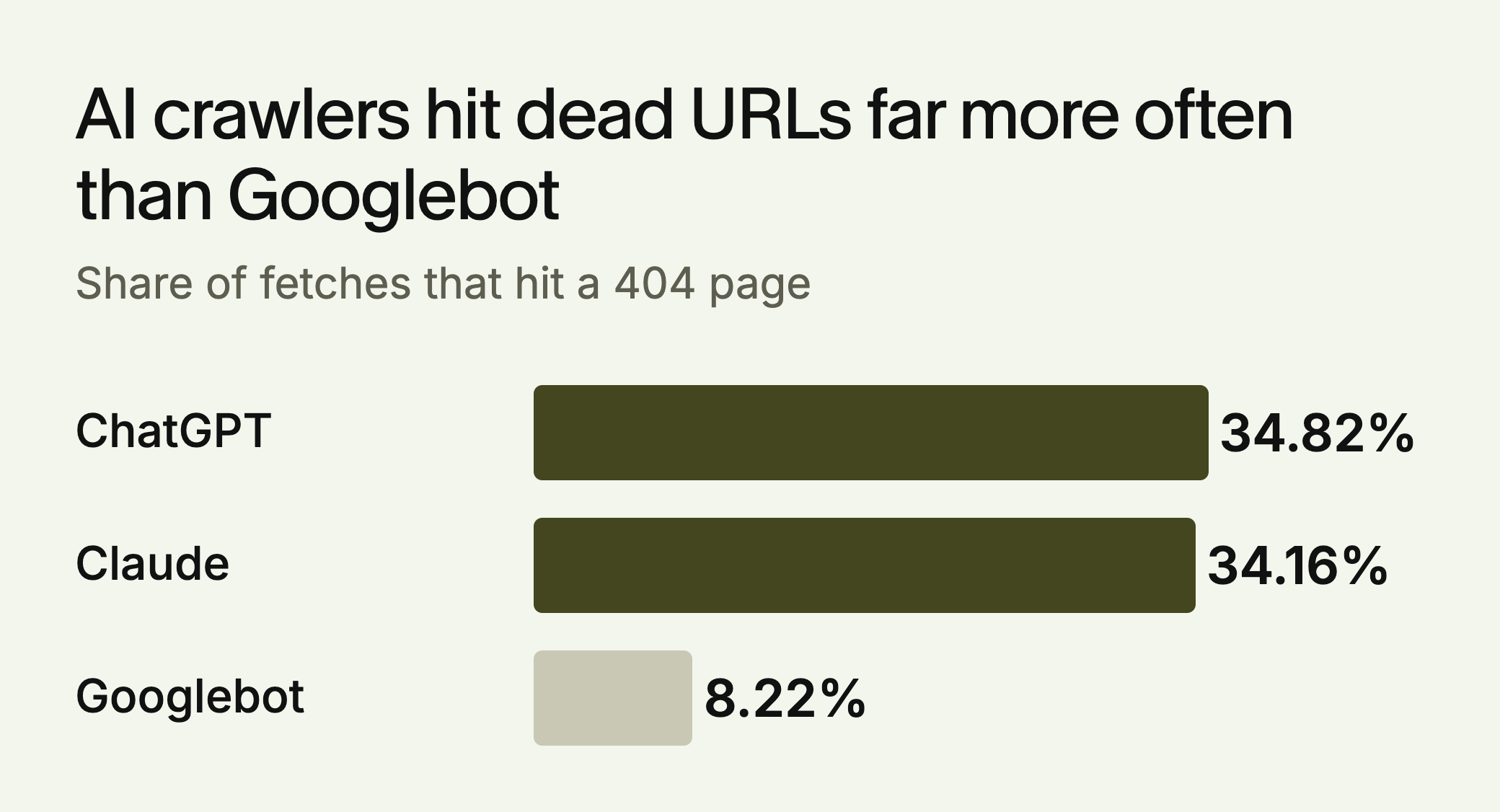
*Source: Vercel, December 2024. Vendor data.*
These figures are from 2024, so check your own logs. This lists the URLs AI crawlers most often fail to find, assuming the common combined log format:
```
grep -E "GPTBot|OAI-SearchBot|ClaudeBot|PerplexityBot" access.log \
| awk '$9 == 404 {print $7}' | sort | uniq -c | sort -rn | head -20
```
Add a 301 redirect for any URL with a natural replacement, and keep your sitemap current. Track one number over time: the share of AI crawler requests that return 404.
## What the Citation Data Shows
We haven’t found a study that isolates client-side rendering and measures its effect on citations. The closest data is about speed. [SE Ranking’s vendor study](https://seranking.com/blog/chatgpt-citation-factors/) of 216,524 pages across 129,000 domains found that pages with a First Contentful Paint under 0.4 seconds averaged 6.7 ChatGPT citations, against 2.1 for pages slower than about 1.1 seconds.
That’s a correlation, and it measures page speed, not rendering method. Faster sites may also be stronger in ways the study can’t separate. The case for server rendering doesn’t depend on it anyway: a crawler can’t cite text it never received.
## What to Do This Week
Run the curl test on your ten most important pages. If the text is missing, list those pages and pick static or server rendering for each. If it’s there, check your robots.txt and firewall rules and move on, because rendering isn’t your problem.
To see how your site looks to AI systems more broadly, try the [free LLMagnet audit](https://ai-visibility.llmagnet.com). LLMagnet measures AI visibility across seven engines, and its agent prepares fixes for you to approve.
## FAQ
### Do AI crawlers execute JavaScript?
Most don’t. Vercel’s December 2024 network analysis found no JavaScript rendering by the crawlers from OpenAI, Anthropic, Meta, ByteDance or Perplexity. Googlebot, Gemini and AppleBot do render it.
### What does an AI crawler see on a React single-page app?
On a client-rendered app, often just an empty root div and a script tag. Product descriptions, FAQs and pricing that JavaScript loads later aren’t in that first response.
### How do I check what AI crawlers see?
Fetch the page with curl using a GPTBot user agent and search the output for a sentence from the page. Viewing the page source in a browser gives the same answer.
### What is the fix for client-rendered pages?
Use server-side rendering or static generation so the full content is in the initial HTML. A prerendering service can bridge the gap, but only for user agents on its list.
### Does rendering affect AI citation rates?
No study we’ve found isolates rendering. SE Ranking found pages with a First Contentful Paint under 0.4 seconds averaged 6.7 ChatGPT citations against 2.1 for slow pages, but that is a correlation with speed.
### Which robots.txt rule controls ChatGPT search?
OAI-SearchBot. OpenAI says sites that opt out of it won’t appear in ChatGPT search answers. GPTBot is the separate crawler for model training.
### Does “use client” in Next.js hide content from AI crawlers?
Not by itself. Next.js prerenders Client Components to HTML on the first load. Content is hidden when it’s fetched in the browser after the page loads, for example inside useEffect, so it’s missing from the first response.